)
A Shopify store is quick to set up, but operating in Germany—one of the most heavily regulated e-commerce markets—can be difficult.
The platform itself makes it possible to use Shopify in Germany in a legally compliant manner from the outset. Nevertheless, as a merchant, you need to be aware of the current legal framework in order to act accordingly.
You must comply with regulations on pricing, data protection (GDPR), and new consumer protection laws (such as the DSA). Failure to comply can result in heavy fines and costly legal consequences such as warnings.
This guide shows you the exact steps to take to protect your business and operate safely in the German market.
Table of contents
- Protected terms and brand names
- Newsletter
- Shopify imprint
- Domain
- Privacy policy
- General Terms and Conditions (GTC)
- Cookie Consent
- Payment options
- Right of withdrawal
- Information obligations immediately before conclusion of the contract
- Quality seals
- Mandatory labeling
- Accessibility (BFSG / EAA)
- Rules for price reductions (“was/now” prices)
- Extended producer responsibility (EPR) for shipping abroad
- DMA compliance and tracking: Google Consent Mode v2 (GCM v2)
- International trade and cross-border sales
Do you need support with your Shopify store? Then feel free to contact us and we will be happy to help you with advice and support. Contact us.
Protected terms and brand names
The use of protected terms and brand names should be avoided as a matter of principle. Likewise, the use of names of other companies should be avoided, as this could result in sanctions under competition law due to an existing risk of confusion.
Newsletter

In the best case, you use the "double opt-in procedure" to realize a customer registration for your newsletter. In this process, the customer confirms his or her agreement to receive the newsletter by checking a box and then clicking on a confirmation link in an e-mail. An already set check mark, which the customer must remove in order not to receive the newsletter, is not permitted. Merely an e-mail informing the customer after setting the check mark entails considerable risks of abuse.
When are you allowed to send newsletters?
Retailers are generally only allowed to send newsletters if they have the express consent of the recipient (usually via the double opt-in described above). An important exception to this is the so-called existing customer privilege under Section 7 (3) UWG (Unfair Competition Act). This allows newsletters to be sent without explicit consent if the email address was collected in connection with the sale of a product or service, the advertising relates to similar products or services, and the recipient has not objected to its use (with reference to the right to object in each message).
The latest ECJ ruling (C-654/23) from November 2025 expands the scope: It clarifies that the collection of the email address does not necessarily have to take place through an actual purchase, but that free registration for a customer account can also be considered sufficient “purchase context” as long as the other requirements of the UWG are met. This makes it easier for Shopify store operators who collect customer data themselves to send newsletters, but the following still applies:
The advertised products must be similar.
The right to object must be clearly communicated.
Reading tip: How to choose the right newsletter tool.
Shopify imprint
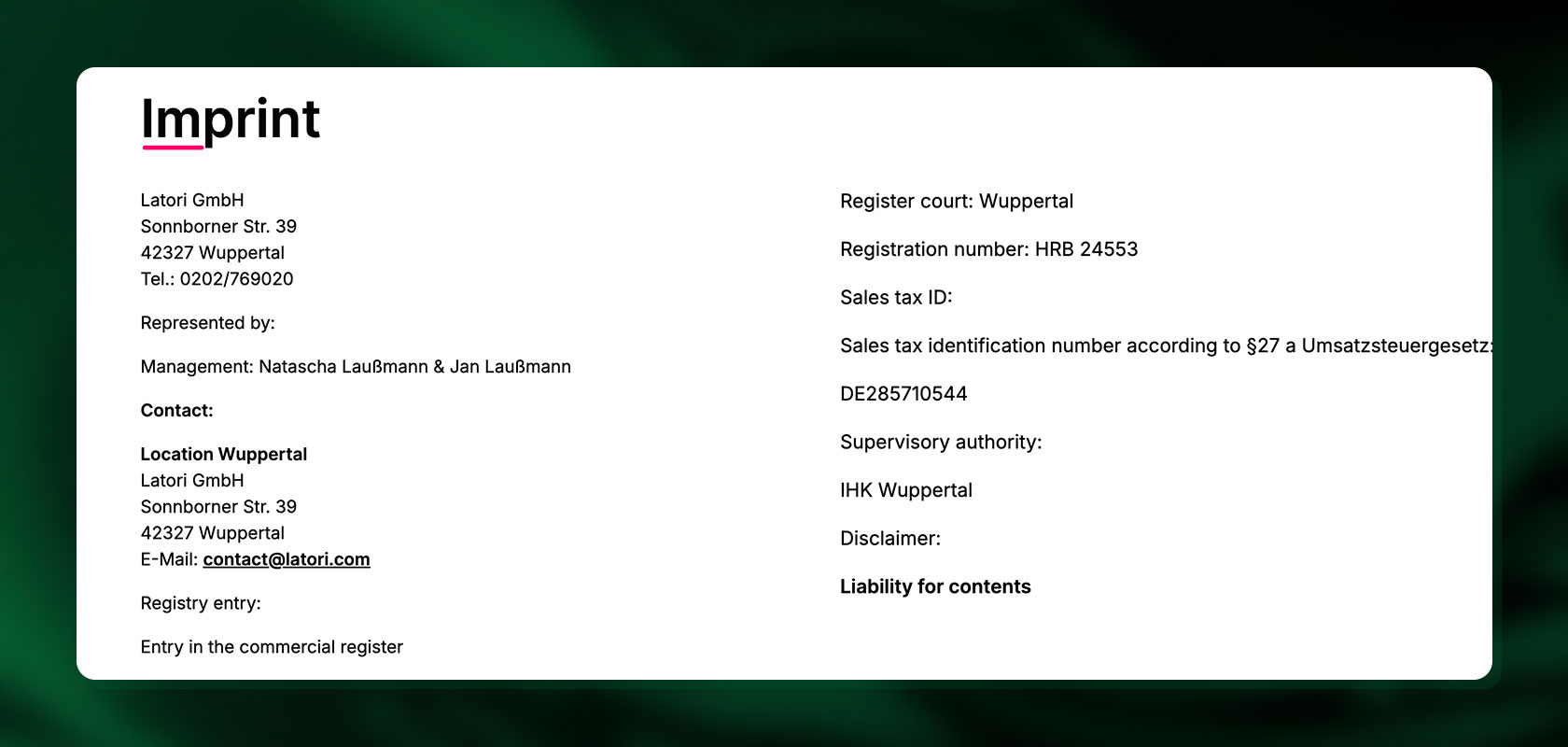
The legally compliant design of your Shopify store begins with a correct legal notice. You should choose “Legal Notice” as the name of an independent, permanently functional link. The link must be compatible with the default settings of common internet browsers and accessible from any subpage with a maximum of two clicks. The necessary mandatory information is currently mainly derived from Section 5 of the Digital Services Act (DDG).
| Category | Natural persons | Corporations and partnerships |
|---|---|---|
| Identity | Last name, at least one first name | Company name, company headquarters with full address |
| Address | Full address | Authorized representative (e.g., managing director) |
| Contact | Contact information (e.g., phone number or email address) | Contact information (e.g., phone number or email address) |
Separate disclosures may be required for special case groups.
To integrate the legal notice into your store, simply go to Settings -> Guidelines in your admin area.

Also interesting: How to create your Shopify imprint.
Important update: Discontinuation of the ODR platform
One frequently discussed issue was the obligation to provide information about the EU Online Dispute Resolution platform (ODR platform). This topic is no longer relevant:
The European Commission's ODR platform has been discontinued.
Since July 20, 2025, the obligation to refer to this platform has been completely abolished.
Please note: All references and links to the ODR platform must be removed immediately from the legal notice, the terms and conditions, and email signatures, as a link to a platform that no longer exists can be considered misleading and result in a warning.
Even though the ODR platform no longer exists, you must still inform consumers in accordance with Section 36 of the VSBG (German Consumer Dispute Resolution Act) whether you participate in dispute resolution proceedings before a consumer arbitration board. This information must be included separately in your legal notice.
Domain
Do not use names of natural persons, such as "www.helge-schneider.de". Also avoid municipality or city names, for example "www.dortmund.de" and terms that describe government institutions, such as "www.gesundheitsamt.de". Equally problematic are film, book or software titles and the like, for example "www.sturmderliebe.de". You can also avoid warnings if you avoid so-called "typo domains", for example "www.googel.de" instead of "www.google.de".
Privacy policy
Any processing of data is only permitted if there is specific permission (legal basis) for it. Without this permission, the use of personal data is prohibited. Furthermore, the data may only be used for the specified purpose (purpose limitation, Art. 5 GDPR).
Your privacy policy must clearly state which of the six legal bases of the GDPR (Art. 6):
Important new features and obligations:
Cookies & tracking: Notices are no longer sufficient. Section 25 TDDDG requires the active, informed opt-in consent of the user for all non-essential cookies. This requires the integration of a consent management platform (CMP).
Deletion obligations: Data that is no longer necessary for the performance of a contract must be deleted immediately (exception: statutory retention periods).
Third country transfers (USA): When using US services (e.g., Shopify or Google), the legal basis for the data transfer must be explicitly stated. Currently, this is the Trans-Atlantic Data Privacy Framework (TADPF).
Comprehensive information: The declaration must continue to contain all details on credit checks, newsletter distribution, social media plugins, and licensing rights.
Integrate privacy policy into Shopify
The privacy policy is stored in the admin area under Settings → Policies. Please note: Do not use the Shopify standard template. Instead, use texts from professional providers (e.g., Händlerbund or avalex) to ensure compliance with the requirements of the GDPR and the TDDDG.

Reading tip: Shopify GDPR: What you should know.
General Terms and Conditions (GTC)
Although not required by law, terms and conditions are essential for limiting liability and clarifying complex contract details. To be legally effective, two requirements must be met:
They must be confirmed by the customer before purchase via a mandatory checkbox.
They must be sent to the customer in text form (e.g., as an email attachment) after the contract has been concluded.
Caution: The greatest risk of warning letters arises from inadmissible clauses that violate consumer protection law. We therefore strongly advise you to use only professionally drafted texts and not to copy content from competitors.
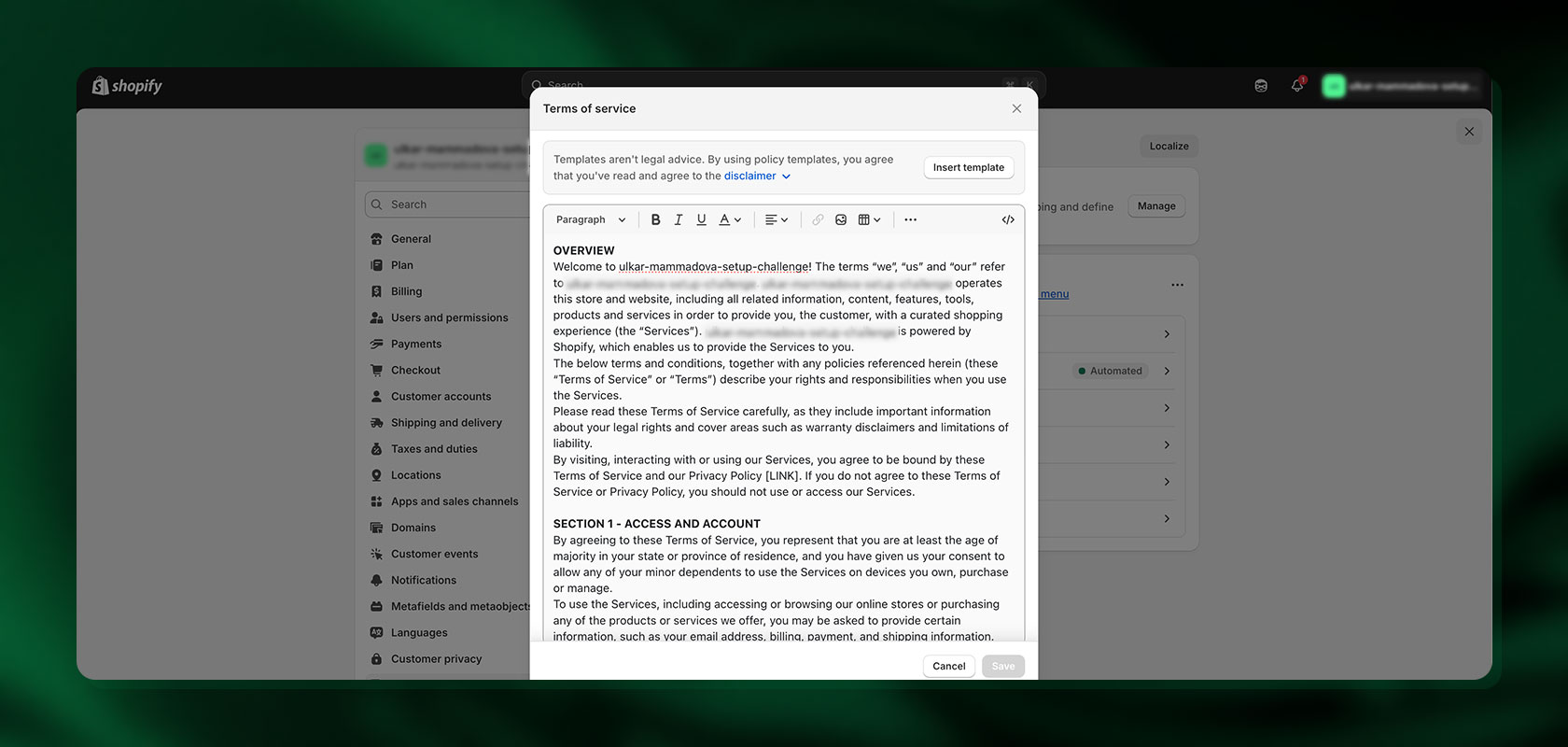 You can also easily enter the terms and conditions in your settings -> Guidelines.
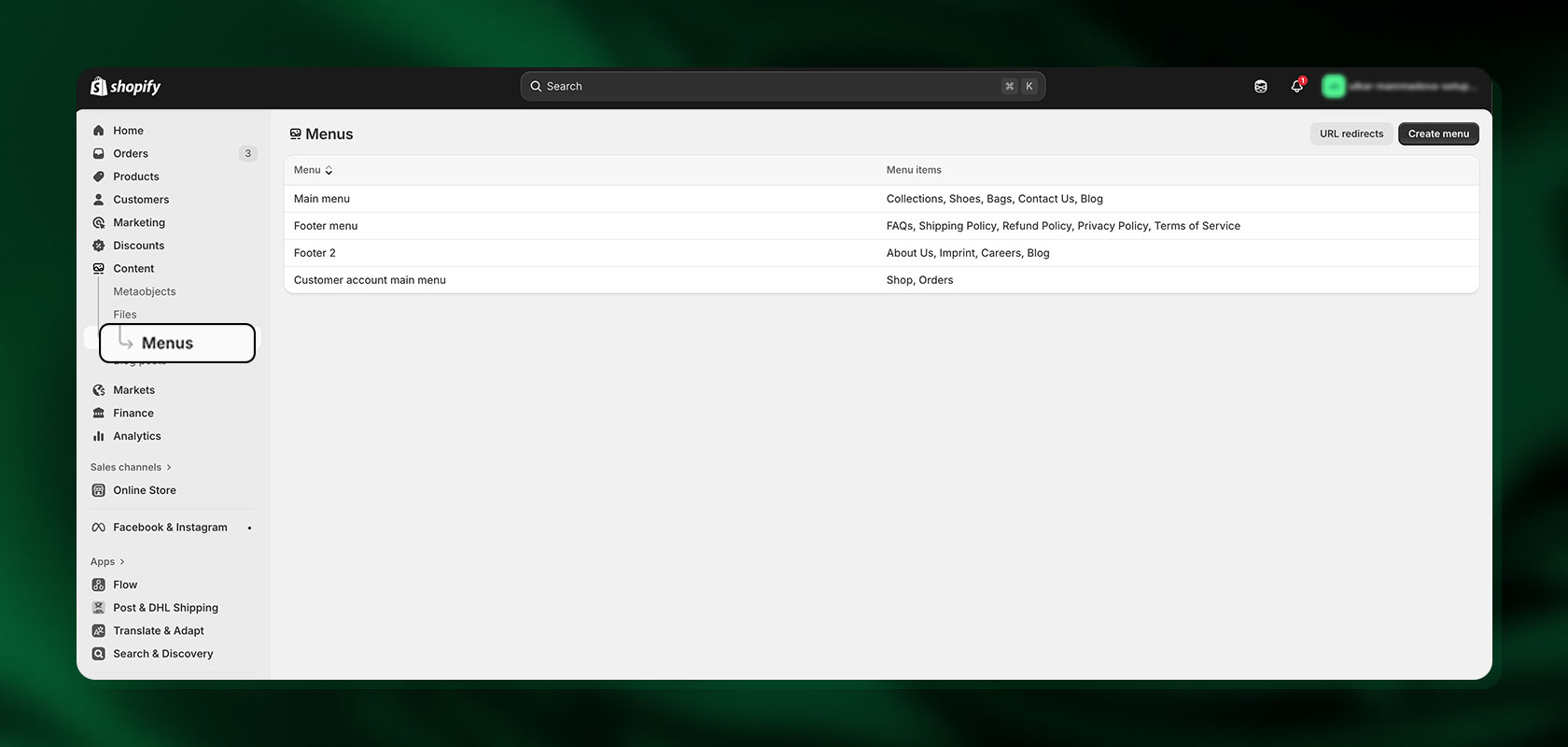 You can then add the terms and conditions, privacy policy or legal notice to your menu. To do this, go to Sales channel -> Online store -> Navigation. Here you can decide where the information should be displayed in the store, e.g. in the footer menu.
Cookie Consent
 Simply providing information about cookies is no longer sufficient: The Telecommunications Digital Services Data Protection Act (TDDDG, § 25) requires the active, informed opt-in consent of the user before you are allowed to load non-essential cookies or tracking tools.
Opt-in requirement: Customers must actively consent. Rejecting cookies must not be made difficult.
Technical requirement: Obtaining and documenting this consent, as well as blocking scripts before consent is given (pre-blocking), requires the integration of a consent management platform (CMP). A simple banner is usually not sufficient for this purpose.
Shopify solution: You must use an external app from the Shopify App Store or a third-party service for CMP functionality, as the native Shopify solutions usually do not meet the high requirements of the TDDDG.
Reading tip: Would you like to learn more about Shopify Cookie Banner? We have summarized all the important information for you in this blog.
Payment options

The possible payment options must be visible before the contract is executed; the General Terms and Conditions (GTC) are best suited for this purpose. You must offer your customers at least one payment method that is free of charge for them. Shopify offers you a direct connection to German payment processing services, SSL certificate included. In addition, information about the time of the debit is mandatory.
Reading tip: Shopify Payments: Merchants can offer these payment methods.
Right of withdrawal
In order to operate a Shopify store in Germany in a legally compliant manner, merchants must also meet various requirements regarding the right of withdrawal.
Right of withdrawal – requirements and Shopify implementation:
According to § 5 DDG (imprint obligation), it is mandatory to provide a telephone number, as the right of withdrawal is no longer bound to the written form. Therefore, make sure that this is included in the legal notice and contact details of the store.
Customers must be able to view the right of withdrawal immediately before completing the order process. You can implement this in Shopify by entering the complete withdrawal text and the sample withdrawal declaration in Settings -> Policies. Shopify automatically links these texts to the shopping cart and checkout pages.

The model withdrawal form must be provided as a legally required form and integrated directly into the policy text.
After the purchase, the right of withdrawal must be communicated to the customer again in writing. You can fulfill this obligation by including the right of withdrawal (or a clear link to it) in the purchase confirmation email that Shopify sends automatically.
Important additional obligations:
The cancellation button (upcoming obligation) will be required in the future to simplify the cancellation policy. This is usually implemented using a special Shopify legal text app or by manually adjusting the shop code.
In the event of a withdrawal, all payments, including standard delivery costs (no costs for express shipping), must be refunded to the customer immediately. This is processed via the Shopify admin area under Orders -> Refund.
The use of a contractual right of return instead of the statutory right of withdrawal is not permitted.
Information obligations immediately before conclusion of the contract
In order to fulfill your obligations as a retailer in a legally compliant manner, you must clearly state the essential characteristics of the goods or services. In accordance with the Price Indication Regulation (PAngV), you must also display the total price and its composition. Please note that the base price (price per unit of measurement, e.g., 100 ml or 1 kg) is mandatory for all products that you sell by weight, volume, or area.
Price details: The total price must include the product price, shipping costs, and, if applicable, costs for the means of distance communication.
Delivery time: The terms of delivery, payment, and performance must be made transparent. It remains the case that courts have declared imprecise information regarding delivery dates (e.g., “the delivery time is usually ... working days”) to be inadmissible—exact delivery dates are mandatory in order to avoid warnings.
Digital goods (new): For digital content or services, you must also provide information on functionality, compatibility, and the scope of necessary updates.
Rights and complaints: You must describe your procedure for handling possible complaints and must indicate the existence of a statutory right to liability for defects.
Correction option: In addition, there must be an easily accessible correction option for customers to correct incorrect entries. This feature ensures that you comply with the DSA requirement to prohibit dark patterns in the checkout process.
Quality seals

In online retail, the following applies: You may not display any quality seals that you do not possess. You must always be able to prove that you possess a seal.
Low standards: Refrain from using quality seals that are awarded for very low requirements or simply for paying a certain amount. Courts consider the use of such seals to be misleading.
Clear validity: If you only hold a quality seal for a specific area or specific products, this must be stated explicitly and unambiguously (e.g., “Only applies to electronic items”).
Transparency requirement (new focus): The seal must be linked to the provider's website at least until it has been verified, where the award criteria and current validity (expiration date) can be seen. An expired seal is misleading.
Verifiability: You must be able to prove at any time that you are legally entitled to use the seal, including with regard to the transparency of the reviews that may be included in the seal.
Mandatory labeling
The labeling requirement has been significantly expanded due to new EU regulations concerning both general safety standards and environmental laws.
1. General safety (GPSR): The General Product Safety Regulation (GPSR) requires you to provide the full contact details (name, address, email/phone number) of the manufacturer or EU importer directly on all physical products and in their online product descriptions.
Implementation in Shopify:
Use the Description field in the product editor to clearly label the manufacturer's/importer's full contact details in the body text.
Alternatively, add this information in a separate meta field, which you can then display in a prominent place in the theme (e.g., below the price).
For physical labeling: Ensure that this contact information is also visible on the product labels or packaging.
2. Extended producer responsibility (EPR): Compliance with the regulations requires not only labeling, but also mandatory registration. Before placing the following items on the market, you must register with the relevant German central offices:
Packaging (VerpackG / LUCID register)
Electrical equipment (ElektroG) and batteries (BattG) (EAR register)
Single-use plastics (EWKFondsG): Certain plastic products (e.g., to-go cups) are subject to a new tax and registration requirement (since 2024).
Implementation in Shopify: Your LUCID registration number and WEEE registration number (ElektroG) must be stated in the legal notice or in the terms and conditions.
3. Special labeling: Traditional labeling requirements remain in place for food, pharmaceuticals, items with FSK/USK ratings, and goods with age restrictions (age verification system recommended for alcohol/tobacco).
Accessibility (BFSG / EAA)

The deadline for full compliance with the German Accessibility Enhancement Act (BFSG) expired on June 28, 2025. Accessibility is therefore a mandatory structural requirement for all e-commerce offerings.
New requirement: The entire web store interface—including checkout, forms, and product presentation—must be designed to be accessible (e.g., compatible with screen readers and navigable via keyboard).
Impact on Shopify: Merchants must ensure that their current Shopify theme and all third-party apps used comply with the EN 301 549 technical standard. The use of older, non-accessible themes now poses a high compliance risk.
Reading tip: We explain how to implement the Accessibility Act for Shopify here.
Rules for price reductions (“was/now” prices)
Since the implementation of the EU Omnibus Directive, extremely strict rules apply to advertising discounts and sales promotions. This is currently a major source of warnings.
New requirement: If you advertise a discount (e.g., “50% off!”), you must indicate the lowest price at which the product was offered in the last 30 days prior to the reduction.
Administration: This rule applies to genuine price reductions. The system must correctly flag exceptions (e.g., personalized or loyalty discounts) and ensure that price history data is reliably stored in the Shopify backend.
Hint: Latori has developed an app just for this purpose! Click here for the Latori Best Price Indicator.
Extended producer responsibility (EPR) for shipping abroad
The existing rules on EPR registration (packaging, electrical appliances) are becoming stricter if you sell goods to other EU countries (remote selling).
New rule: If you sell products (e.g., electronics, batteries, packaging) to customers in another EU country (such as Austria or France), you must check whether your manufacturer/supplier is EPR-registered in that destination country. If not, you are considered the manufacturer in that country and must register there yourself and fulfill all reporting obligations.

What you should do: Shopify merchants must ensure that they check the EPR obligations for each country they ship to and register themselves if necessary.
DMA compliance and tracking: Google Consent Mode v2 (GCM v2)
The Digital Markets Act (DMA) imposes stricter rules on gatekeepers (Google, Meta). For Shopify merchants, this leads to immediate technical consequences in marketing tracking.
Key requirement: GCM v2
To continue using conversions and data for Google Ads (retargeting, optimization), you must implement Google Consent Mode v2 (GCM v2). Without it, you risk losing important campaign data.
What Shopify merchants need to do now:
Check CMP: The app that manages your cookie banner (CMP) must be GCM v2-compatible (e.g., “Aboalarm,” “Cookiebot”).
Check integration: Ensure that the CMP correctly connects Consent Mode v2 with your Google tags (GA4, Ads).
Shopify settings: Go to Settings > Customer Privacy to check whether consent is enabled correctly. A professional CMP app is usually required for full GCM v2 implementation.
Meta: Also check the compliance of your meta pixels and Conversions API.
International trade and cross-border sales

Selling internationally via Shopify opens up new market opportunities, but also brings with it legal considerations. Here are some important aspects to consider when selling internationally via Shopify:
Customs and import regulations
Each country has its own customs and import regulations. This concerns the declaration of goods, customs tariffs, import restrictions and prohibitions. Find out about the specific requirements of the countries you want to export to.
International shipping
Consider the shipping costs and the different delivery times for international shipments. Clarify whether you are able to ship worldwide and which shipping service providers are available in the destination countries.
Currency conversion
Shopify allows you to specify prices in different currencies. Take into account exchange rate fluctuations and the possibility of customers paying in other currencies.
Tax aspects
Sales tax regulations can vary greatly from country to country. Check whether and how you handle VAT for international sales correctly. This may include the issue of small business regulations and other tax considerations.
The Shopify Tax Exempt Manager app developed by Latori helps you to sell internationally in a legally compliant way.
Local laws and regulations:
Be sure to comply with all local laws and regulations in the countries you are exporting to. This may include product requirements, labeling regulations and other legal considerations.
Return policies:
Clarify if and how you handle international returns. Inform your customers transparently about the return policy and the associated costs.
Liability and guarantees:
Understand the liability laws and warranty requirements in the countries you export to. This can vary depending on the product category.
Trade sanctions monitoring:
Make sure your products are not affected by trade sanctions. Check the current lists and regulations to ensure that your international sales comply with the relevant laws.
You have further questions about Shopify? Then feel free to contact us and we will gladly help you out.
Frequently asked questions about using Shopify legally in Germany
Is Shopify legal in Germany?
Yes. German online merchants can sell legally compliant with Shopify, as long as some precautions are taken.
Is Shopify legally compliant in Germany?
Shopify comes with the technical requirements you need to comply with legal requirements. However, you as a merchant must take some precautions yourself - as with other store systems.
Which legal texts do I need to integrate into the online store?
You should include the following legal texts in your store: General Terms and Conditions (GTC), privacy policy, imprint, right of withdrawal, payment and shipping information, and battery disposal information.
Is Shopify suitable for German law?
Yes, Shopify is generally suitable for use in the German market. However, there are some legal aspects and adjustments that should be taken into account to ensure that your Shopify store complies with German law. It is important that you familiarize yourself with the current legal requirements.
Is Shopify warning-proof?
Whether a Shopify store is "warning-proof" depends largely on whether it is operated in a legally sound manner and complies with legal requirements. The responsibility for the legal design and operation of the store lies with the store operator. However, Shopify provides resources and features to help merchants comply with legal requirements.
How can I integrate legal texts in Shopify?
To integrate legal texts, simply go to Settings -> Policies in the admin area. Here you can now insert legal texts such as terms and conditions, privacy policy or the legal notice.
