
There are several settings available for changing the language of the Shopify admin or adding another language to your online store. You can manage the admin language through your profile, and additional store languages under Settings > Languages.
In this blog post, we’ll explain how to change the language in the Shopify admin panel, set up additional language versions for your store, and translate content. We’ll also highlight what you should keep in mind regarding Shopify Markets, SEO, checkout, and legal text—especially if you’re a merchant selling in Germany, Austria, or Switzerland.
Reading tip: We show you when you should switch to Shopify Plus here.
Table of contents
- Change Shopify Language: Admin, Store, and Checkout
- Setting Up a Multilingual Shopify Store
- Advantages of multilingualism in online shops
- Translating Shopify: Content, English, and Themes
- Shopify Translation Apps, Prices & Comparison
- Multilingualism and SEO
- Legal texts in multiple languages
- Checklist: How to Properly Prepare a Multilingual Shopify Store
- Conclusion
You need help with Shopify settings? Feel free to contact us and we will be happy to help you. Contact us
Change Shopify Language: Admin, Store, and Checkout
Quick Insight: How do I change the language in Shopify?
The language of the Shopify admin panel and the language of your online store are managed separately. You can change the language of the user interface in your profile. You can manage additional languages for your store under Settings -> Languages.
Reading tip: We show you how to use Shopify in Germany in a legally compliant manner.
1. Change language for the admin area (user interface)
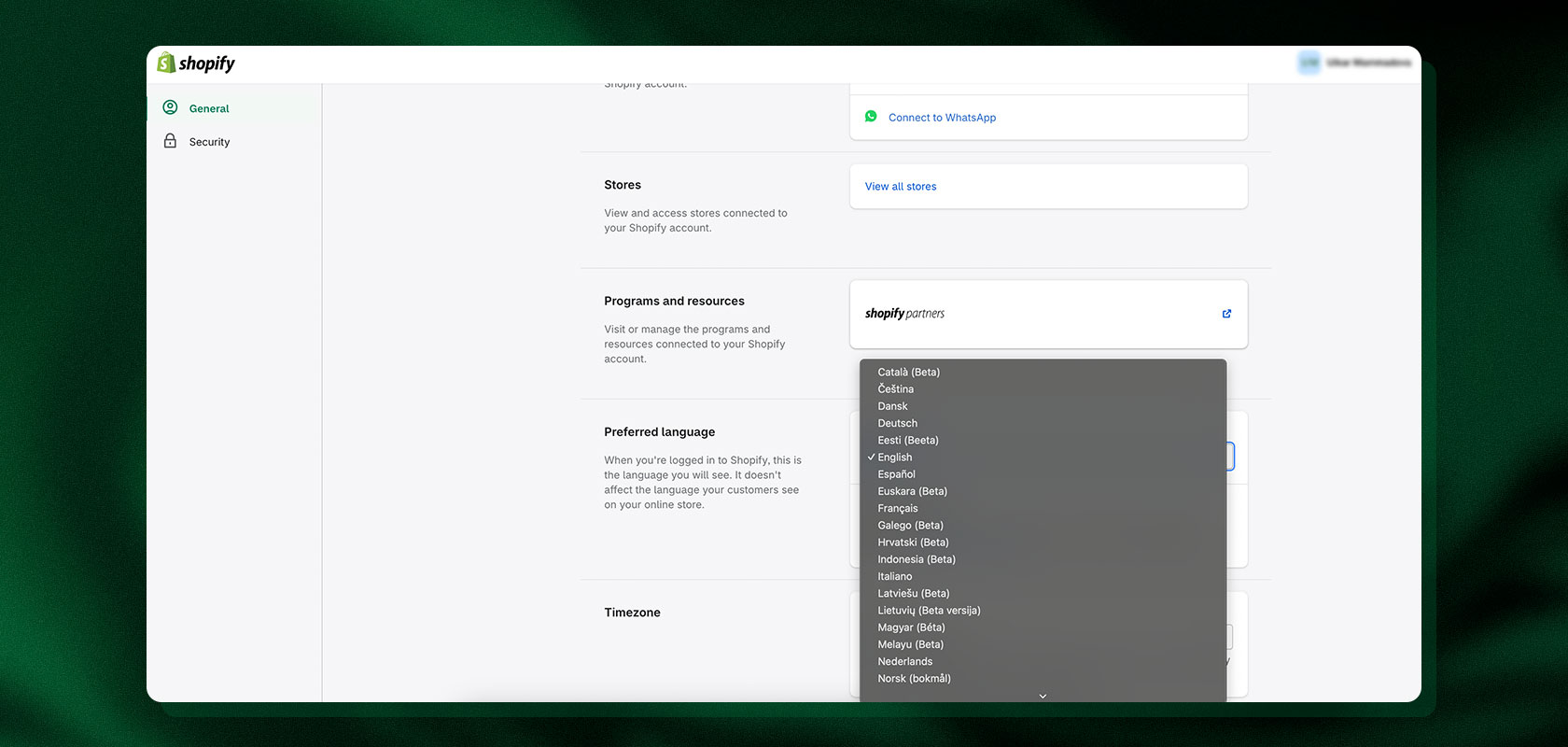
Log in to the Shopify admin.
Click your profile picture or name in the top right corner, then click Account.
Under “Language,” select the desired language from the drop-down menu.
2. Change the online store's language and add additional languages
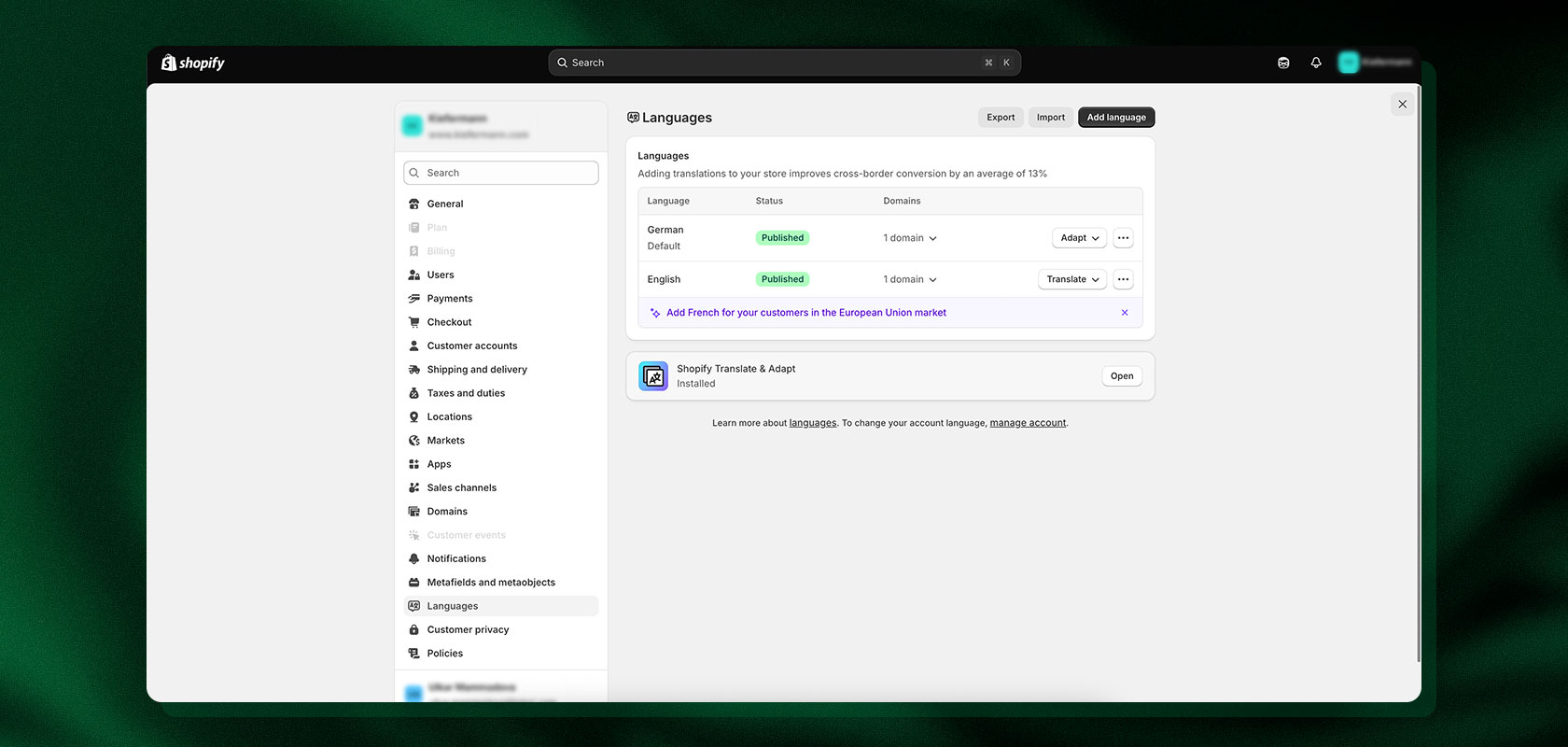
Open the Shopify admin area.
Click on “Settings” in the lower left corner.
Click on “Languages.”
Manage and add the desired languages.
3. Customize Checkout Language
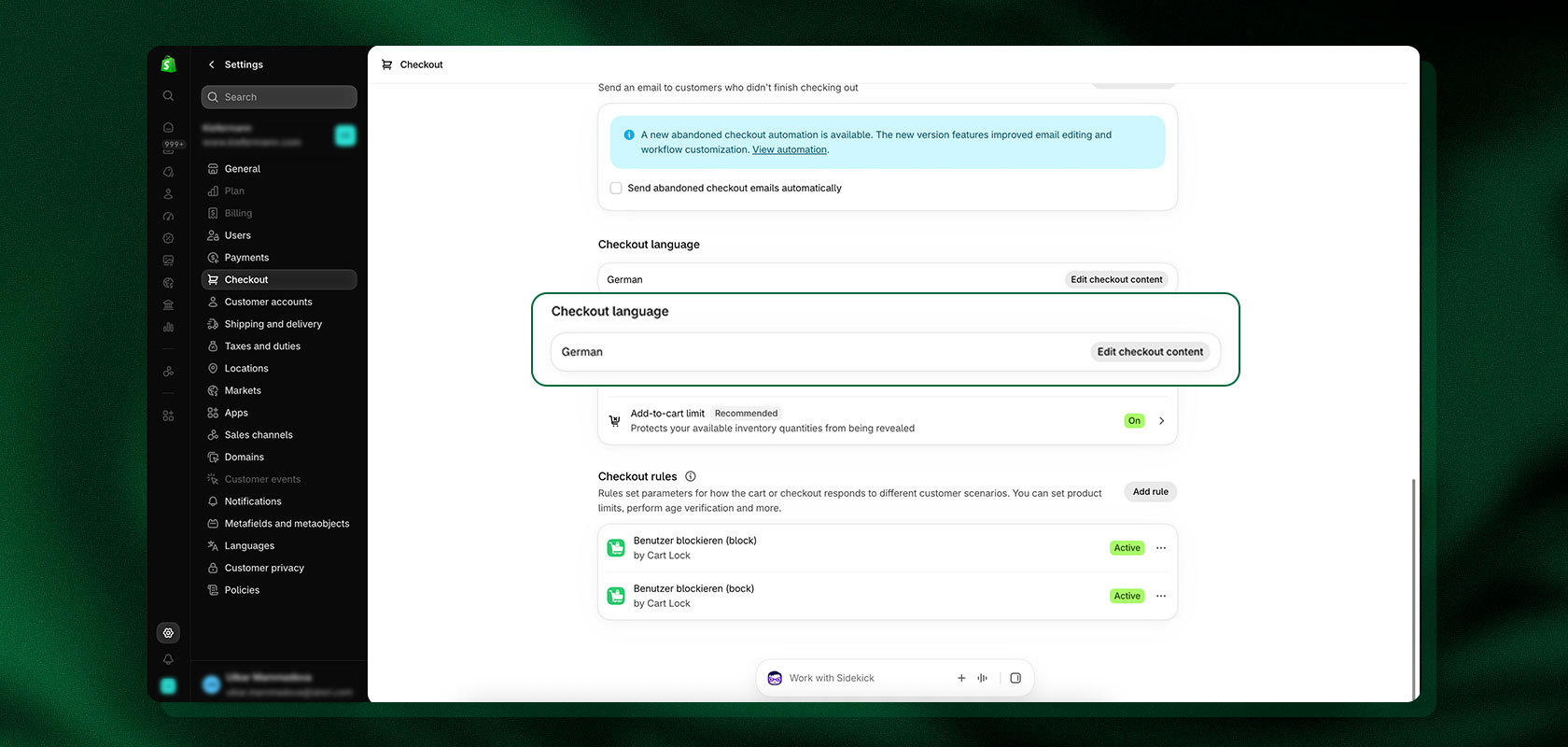
Open the Shopify admin area.
Click on “Settings” in the lower left corner.
Click on “Checkout.”
In the Checkout Language section, select the Edit Checkout Content option.
Customize the checkout text as desired and save your changes.
The checkout language can be based on the language selected in the store. Shopify provides pre-translated default content for the checkout in numerous languages. Shopify currently offers pre-translated checkout content for 33 languages.
You can customize the default checkout text in the Shopify admin. For more advanced checkout customizations, additional solutions or third-party apps may be required, depending on your specific use case.
Reading tip: Shopify Hacks: Do you already know these useful tips and tricks?
Setting Up a Multilingual Shopify Store
An international store opens up new markets: When you offer products to a global audience, providing multiple languages is a crucial step toward an optimal shopping experience and higher conversion rates.
Quick Insight: How do I set up multiple languages in Shopify?
Go to Settings > Languages to add another language, and then manage the translations. A paid translation app is not required for this. Shopify offers a built-in solution called Translate & Adapt; alternatively, you can use compatible third-party apps or imported translations.
Step by Step
Open Settings > Languages in your Shopify admin.
Click Add language.
Select the language you want.
Translate the relevant content.
Preview the language version.
Publish the language version once you’ve reviewed the most important content.
Do I need an app for a multilingual store?
Not necessarily. Shopify supports multiple languages and offers Translate & Adapt, a built-in translation solution. Alternatively, you can use compatible third-party apps or import translations via CSV.
Third-party apps can be useful if you need additional translation features or need to translate third-party content.
How many languages can I offer in Shopify?
On the Basic, Grow, Shopify, and Advanced plans, you can currently offer up to 20 languages per store. Shopify Plus and Shopify Enterprise Commerce support up to 30 languages.
Can I use regional language variants for Germany, Austria, and Switzerland (de-DE, de-CH, de-AT)?
Yes. Especially for stores in Germany, Austria, and Switzerland, it’s important to distinguish between language and market. For example, Germany, Austria, and Switzerland can use the same German language version, while prices, currencies, shipping information, product names, and other content are tailored to the respective market.
Shopify Markets supports linking markets to languages, domains, and other settings.
For Switzerland, French or another language may also be relevant, depending on the target audience. However, regional adaptation does not automatically mean that a new language version is required.
Latori Expert Tip: Plan Language and Market Together
Shopify automatically generates hreflang tags based on the configured markets, languages, and international domains. This allows search engines to match a page to its respective language and market versions.
Language and market should therefore be considered together right from the planning stage. Before launch, check not only the translation but also domains, prices, currencies, shipping information, and market-specific content.
Advantages of multilingualism in online shops
Multilingual support can be particularly beneficial for Shopify merchants when they want to tap into new markets or reach customers in their preferred language. Key benefits include a better user experience, fewer language-related barriers to purchase, and additional opportunities for international SEO.
Larger target audiences: Multilingual content makes it possible to reach customers in additional language and sales markets.
Better user experience: Product information, navigation, and other content can be provided in the customer’s preferred language.
International SEO: Separate language versions and corresponding URLs can help improve discoverability in additional language markets.

Translating Shopify: Content, English, and Themes
Complete localization isn't limited to just the main text: To ensure that international customers can shop seamlessly in their own language, all elements of your online store must be coordinated.
Quick Insight: What can be translated in Shopify?
In Shopify, you can translate product information, pages, menus, meta fields, SEO content, and theme content, among other things. Different translation options and restrictions apply depending on the content.
Shopify, for example, notes that product tags, article tags, and blog tags cannot be translated.
Translate Your Shopify Store into English
If you want to offer your Shopify store in English, first add English under Settings > Languages. You can then translate the relevant content and review the language version.
When creating an English version, pay special attention to the following:
Product names
Technical terms
Units of measurement
Marketing copy
SEO titles and meta descriptions
Image alt text
A direct translation isn’t always sufficient. Depending on the target market, cultural or regional adaptations may also be necessary.
Translating Products, Pages, and Menus
With Translate & Adapt, translations can be managed directly in the Shopify admin. Automatic translations can serve as a starting point.
For product names, technical terms, marketing copy, and regional nuances, a manual review is recommended afterward.
New or updated content should also be reviewed regularly. Automatic translations are not necessarily regenerated automatically with every change.
Content beyond standard product and page translations should also be taken into account. This includes, for example, email notifications and content from third-party apps.
Translating a Shopify Theme
Additional adjustments may be necessary for custom themes or custom code. Text that is hardcoded into the theme (“hardcoded strings”) is not necessarily captured by every translation solution.
Latori Expert Tip: Check Translations in the Theme
After translation, be sure to check text lengths, special characters, and how the text appears on mobile devices. Translations can be significantly longer or shorter than the source text.
Shopify Translation Apps, Prices & Comparison
Quick Insight: How much does Shopify translation cost?
Shopify offers a free translation solution called Translate & Adapt. A paid app is not strictly necessary. For more extensive translation needs, third-party apps such as Langify can provide additional features.
Translate & Adapt
The Shopify app Translate & Adapt is a free solution from Shopify that allows you to make your store multilingual and adapt content to different markets.
Features & benefits:
Manual translations
Automatic translation
Market-specific adaptation (Adapt)
Supports multilingualism in the frontend
Translation of products, pages, blog posts, guidelines, and other content
Translation of meta fields
Direct integration with Shopify
Language-specific URLs for published language versions
Automatic translation is currently available for up to two languages. Additional language versions can be translated manually or using compatible third-party apps. Automatic translations should be reviewed before publication.
Note: Legally relevant content, such as policies, should not be automatically translated without review.
Langify
Langify is a paid Shopify app that enables stores to offer multilingual services. Unlike Shopify Translate & Adapt, Langify is developed by a third-party provider and offers advanced features that are particularly useful for more complex translation requirements.
Features and benefits:
Manual translations
Automatic translations
SEO optimization
Import/export
Language switcher
Automatic redirection
Translation of Meta Fields
Translation of Third-Party Apps
Comprehensive Control Over Translations
Pricing:
Free Plan: Free
Basic Plan: $17.50/month
Growth Plan: $29.95/month
Premium Plan: $59.95/month
The appropriate solution depends, among other things, on the size of the online store, the number of languages, the translation workflow, and the required integrations.
| Criterion | Translate & Adapt | Langify |
|---|---|---|
| Provider | Shopify | langify GmbH & Co. KG |
| Price | Free | Paid subscription |
| Automatic Translation | Up to 2 languages via Translate & Adapt | Depending on plan |
| Manual Translation | Yes | Yes |
| Special Feature | Tight integration into Shopify & Markets | Extensive translation management |
| SEO-Relevant Content | Yes | Yes |
| URL Translation | Yes | Yes |
You should check the current prices and included features directly in the Shopify App Store before booking.
Latori Expert Tip: Plan Language and Market Together
For international stores, language and market should not be considered in isolation. Shopify Markets can link language, domain structure, prices, currencies, and other market-specific settings.
Reading tip: Shopify Markets vs. Shopify Markets Pro – A direct comparison of both solutions for your international e-commerce business.
Multilingualism and SEO
Quick Insight: Is Shopify suitable for multilingual SEO?
Yes. Shopify supports multilingual URLs and generates hreflang tags based on the market and language configuration. For international SEO, you should also consider translated SEO titles, meta descriptions, alt text, and URL slugs.
Does Shopify automatically set hreflang tags?
Yes. Shopify automatically adds hreflang tags for published language versions. Published languages are also included in sitemaps.
Shopify can organize different markets using subfolders, subdomains, or separate domains. The specific hreflang configuration depends on the market, language, and domain structure used.
Changing and Translating Shopify URLs
For multilingual Shopify stores, Shopify generates its own URLs for each language version. URL slugs can be translated—for example, from /en-ca/products/shoes to /es-mx/products/zapatos.
However, system components such as “products” cannot be translated arbitrarily. Additionally, URL slugs cannot be customized individually for specific markets.
What SEO content should I translate?
In addition to the visible content, you should pay particular attention to the following elements:
SEO titles
Meta descriptions
Image alt text
URL slugs
Relevant meta fields
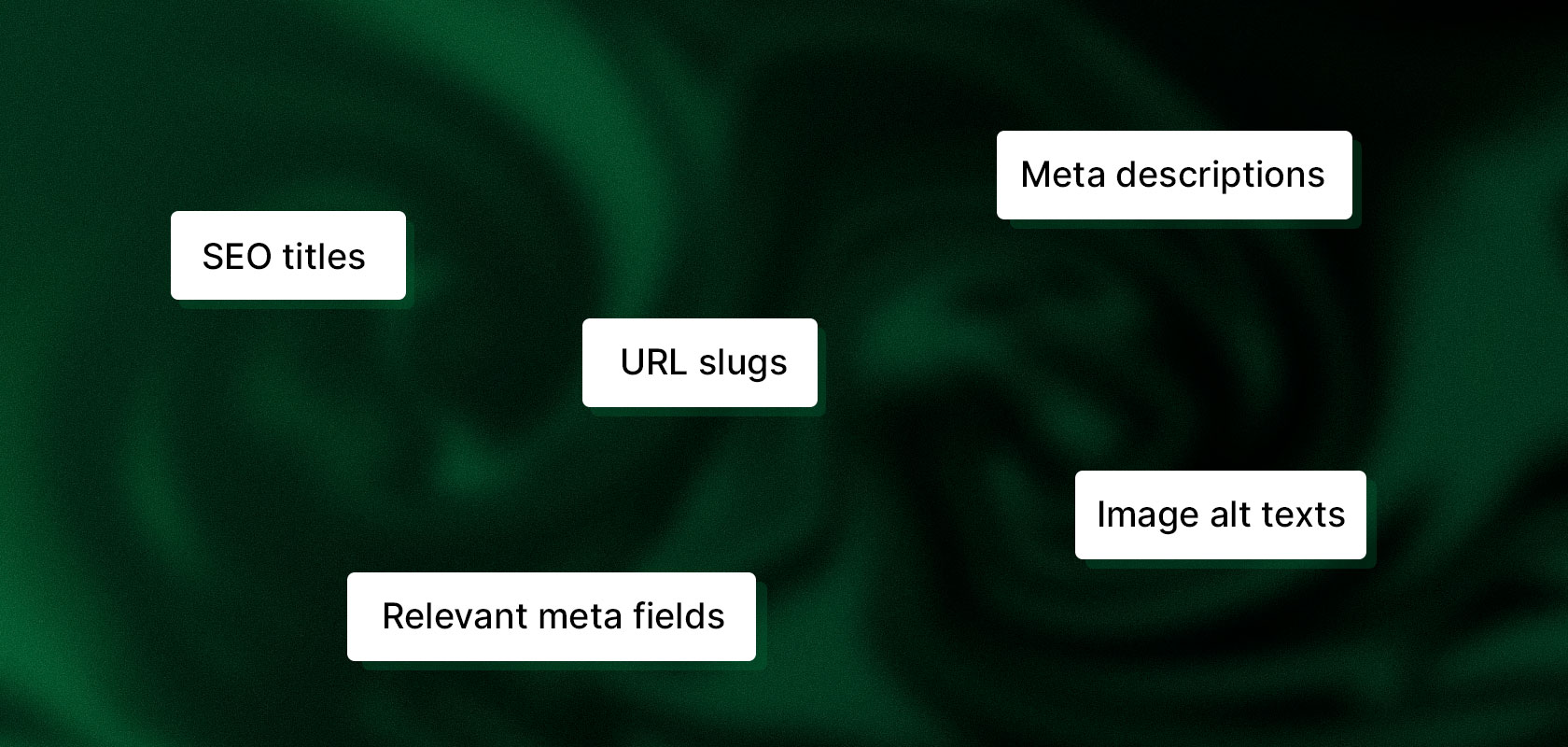
Product pages also have a special feature: If the meta title and meta description still use the default values, they are derived from the translated product title and product description. Customized SEO fields, on the other hand, can be translated separately.
How do I avoid partially translated pages?
Before publishing, check the most important pages, navigation, product information, theme content, and the checkout process.
Untranslated content may still appear in the primary language within a published language version. That’s why it’s worth reviewing the most important customer paths before going live.
The following are particularly important:
Homepage
Navigation
Category and product pages
Shopping cart
Checkout
Contact and service pages
Legally relevant content
Legal texts in multiple languages

Quick Insight: Do legal texts need to be translated?
For multilingual online stores, legally relevant information should be presented in a way that is understandable and accessible to the respective target audiences. The specific requirements that apply depend, among other things, on the target market and the applicable law.
Legal notices, privacy policies, terms and conditions, cancellation policies, and other legally relevant information should therefore not be machine-translated without review.
Important: A translation alone does not automatically make a legal text suitable for every target country. Germany, Austria, and Switzerland may have different legal requirements despite sharing a common language.
Do the legal notice, terms and conditions, and privacy policy apply to every language version?
For DACH merchants, it is particularly important to verify whether the content used can indeed be applied identically in Germany, Austria, and Switzerland. When selling to other countries, additional requirements may apply.
Note for DACH merchants: External documents such as PDF invoices or cookie consent banners may need to be configured in multiple languages directly within the respective apps.
Latori Expert Tip: Review Legal Texts
Automatic translations can lead to discrepancies in content when it comes to legal wording. Therefore, have relevant legal texts reviewed by a technical or legal expert.
Checklist: How to Properly Prepare a Multilingual Shopify Store
To ensure that your Shopify store’s multilingual functionality works as smoothly as possible, you should review not only the translations but the entire customer journey before going live.
Test a new language before going live by following the most important customer paths.
Leave brand and product names untranslated only if it makes sense from a linguistic and brand strategy perspective.
Manually review automatically translated legal and checkout texts.
Be sure to translate relevant image alt text and meta fields as well.
Test the language switcher on mobile devices.
For DACH markets, also check currency, prices, shipping information, and regional product terms.
Check third-party apps to ensure their content is also displayed in multiple languages.
For right-to-left (RTL) languages such as Arabic or Hebrew, verify that your theme supports right-to-left display.
Conclusion
On Shopify, you can change the language of the admin panel and add additional languages to your online store. An additional app is not strictly necessary for a multilingual Shopify store.
Translate & Adapt also offers a free Shopify solution for translations and market-specific adaptations. Third-party apps like Langify can provide additional features for managing translations, depending on your needs.
For international stores, however, translation alone isn’t enough. Language, Shopify Markets, URL structure, content, checkout, and SEO should be considered as part of a cohesive localization strategy.
We would also be happy to discuss your project and support you professionally as a Shopify Plus agency. Contact us now
Frequently Asked Questions About Setting Up Languages in a Shopify Store
Can I set up a multilingual Shopify store without a translation app?
Yes. Shopify provides an integrated option with Translate & Adapt to set up multiple languages for your online store and translate content. Alternatively, compatible third-party apps or imported translations can be used.
How many languages can I add in Shopify?
Depending on your Shopify plan, up to 20 languages can be added. For Shopify Plus and Enterprise Commerce, up to 30 languages are supported.
Is Shopify Translate & Adapt free?
Yes. Translate & Adapt is available as a free integrated Shopify solution. Automatic translations are currently supported for up to two languages. Additional language versions can be translated manually or expanded using a compatible translation app.
How do I change the language of the Shopify admin area?
The language of the Shopify admin area is changed via your own profile or account settings. This setting only affects the admin interface and does not automatically change the language that customers see in the online store.
Do I need a separate language version for Germany, Austria, and Switzerland?
No. Generally, the same German language version can be used for Germany, Austria, and Switzerland. However, via Shopify Markets, individual markets can still be configured differently—for example, regarding prices, currencies, domains, shipping information, and other content.
Does Shopify automatically create hreflang tags for multilingual stores?
Yes. Shopify automatically generates corresponding hreflang tags for published language and market configurations. For a clean international SEO structure, translated SEO titles, meta descriptions, URL slugs, and other relevant content should still be reviewed.
Can I translate product URLs and other URL components?
Partially. Translatable URL slugs can be customized for language versions, while certain system components like /products/ cannot be translated. Additionally, the URL structure cannot be defined independently for each market.
Can I translate checkout content into multiple languages?
Yes. Shopify provides pre-translated checkout content for 33 languages. In addition, checkout texts can be edited via the checkout settings. The available options depend, among other things, on the theme used and the respective checkout configuration.
