Shopify Apps für Cross-Selling und Upselling: Die besten Lösungen für mehr Umsatz
Monday 5 October 2026

Shopify Apps for Cross-Selling and Upselling: The Best Solutions for Increasing Revenue

Imagine a customer has already added a product to their cart—meaning they’ve cleared the biggest hurdle in the customer journey. Why should the purchase end there? We all know it’s much easier and more cost-effective to increase the order value of a customer who’s ready to buy than to go to the trouble of attracting a new visitor to the store. This is exactly where smart cross-selling and upselling tools come into play.

But anyone searching the Shopify App Store for the right solution can quickly feel overwhelmed. There are currently well over 1,000 apps in this category, all promising to boost sales. So how can you tell which app really delivers on its promises?

In this post, we’ll set aside the general theory and focus entirely on the technical details. Together, we’ll take a look at the native features Shopify already offers, which app categories are best suited for which purposes, and most importantly: which solution best fits your specific product lineup, your tech stack, and your growth goals.

Quick Insight: What is cross-selling, and what is upselling?

  • Cross-selling involves offering complementary products to the selected item (example: camera + memory card).

  • Upselling aims to convince customers to choose a higher-value option (example: premium version instead of standard version).

Both strategies effectively expand the shopping cart and increase the average order value (AOV)—without disrupting the customer experience with irrelevant offers.

Would you like to fully leverage the potential of your Shopify (Plus) store, but are still unsure about which tools to choose? Latori can help you identify the right cross-selling and upselling solutions and integrate them seamlessly into your store. Feel free to contact us—we’ll find the right strategy for your product lineup.

Native Shopify Features or a Third-Party App?

Often, the first instinct when faced with new e-commerce requirements is clear: “We’ll just quickly install an app for that!” But before you start browsing the Shopify App Store and potentially burden your theme with third-party scripts, it’s worth taking a closer look at the system’s built-in features. Shopify has significantly expanded its capabilities in recent years, so not every project requires a paid third-party tool.

Shopify comes with a solid, free set of built-in features:

  • Native Product Recommendations: Automatically generates related items on the product detail page based on purchase history and product data.

  • Shopify Search & Discovery: Allows merchants to manually assign complementary products and precisely control search filters and recommendation logic.

  • Shopify Bundles: This free, official app supports fixed bundle offers and multipacks without additional software costs.

When native features are sufficient: If you’re just getting started with cross-selling, your product range is manageable, and you can maintain product relationships manually. Even if you only want to offer your customers simple, pre-packaged bundles (such as a classic 3-pack) for the time being, the standard features provide an excellent and cost-effective solution.

When an external app becomes essential: As your product catalog grows, manual maintenance becomes a Herculean task. As soon as you need dynamic, AI-driven recommendations that adapt in real time to your users’ behavior, native features reach their limits. The same applies if you want to conduct data-driven A/B tests, work with customer segments, or place seamless upsells directly in the shopping cart and at checkout. At this point, a specialized app goes from being a “nice-to-have” to a crucial scaling lever.

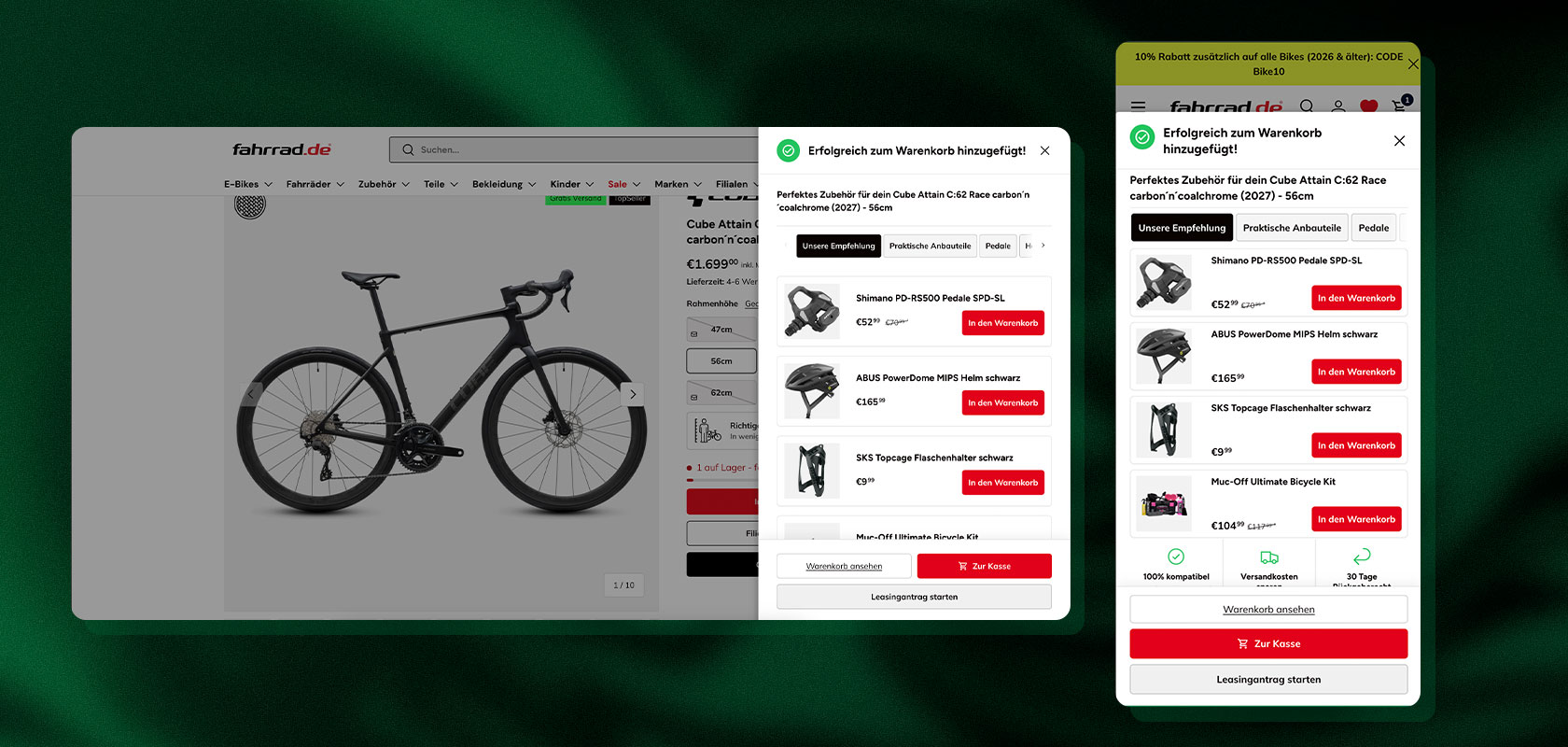
A page on the online store showing a Cube Attain C:62 road bike with accessories such as pedals, a helmet, and a bottle cage in the shopping cart.

Reading tip: In our guide to cross-selling in e-commerce, we show you how to use product recommendations in a targeted and strategic way.

Which product relationships require which technology? Not every product line can be marketed using the same app. The choice of tool depends heavily on how your products relate to one another:

  • Accessories & Add-ons (e.g., smartphone + case): Classic product recommendation apps on the product page work best for this.

  • Consumables (e.g., coffee maker + capsules): Ideal for post-purchase apps. The impulse to make an additional purchase after checkout works exceptionally well here.

  • Upgrades (e.g., standard to premium version): These can be implemented technically very well using a modern cart drawer, where the upgrade is selected with a single click right before checkout.

  • Sets (e.g., pants, shirt, and shoes): These require “Complete the Look” features or sophisticated bundle apps that ensure ERP inventory levels are accurate when selecting sizes.

Cross-Selling, Upselling, and Bundles: What app features do you need?

Two bottles of HFO gel and two jars of moisturizer on a white surface, surrounded by colorful decorative pumpkins.

Before you browse the Shopify App Store, you should determine which features you need for your store. An app that’s great for classic product recommendations isn’t necessarily the best choice for complex bundle offers or post-purchase upsells.

While simple product recommendations can be implemented with a standard recommendation app, bundles, cart upsells, and post-purchase offers each require different technical features.

The question of whether products should be linked manually or recommended dynamically using AI logic also influences your choice of software. Use the following overview to determine which app category best fits your strategy:

Reading tip: Check out our guide to learn how to successfully implement Shopify Bundles and use product bundles strategically for your store.

Mechanism / StrategyVendor GoalRequired App CategoryExample
Cross-SellingSell complementary productsProduct Recommendation AppsLaptop + Mouse
UpsellingOffer a higher-value productCart Drawer / PDP Upsell AppsStandard to premium model
Frequently Bought TogetherEncourage bundle purchasesFBT & Recommendation AppsShirt + matching pants
BundlesSell product packagesBundle Apps (Fixed or Mix & Match)3-piece skincare set
Volume DiscountGrant quantity discountsVolume / Tiered Discount Apps3 items for a special price
Cart UpsellReach threshold valuesCart Drawer Apps (with Free Shipping Bar)"Only €15 away from free shipping"
Post-Purchase UpsellIncrease revenue after checkoutPost-Purchase AppsCare product offered after payment

A row of leather jackets in various shades hanging on a coat rack.

Practical App Architecture: The Recommendation Journey in a Fashion Store

The example of a fashion store specializing in leather jackets clearly illustrates how these various app mechanics work together technically. Instead of using isolated individual widgets, the appropriate app technologies are coordinated along the customer journey:

  1. On the product page (PDP): A recommendation app uses App Blocks to display a “Complete the Look” widget (leather jacket + pants + belt) directly below the product images. The customer can add the entire outfit to the shopping cart with a single click.

  2. In the shopping cart (Cart Drawer): As soon as the jacket is in the shopping cart, a Cart Drawer app takes over. It displays an interactive progress bar for free shipping and also suggests a matching scarf as a quick add-on.

  3. At checkout: A checkout UI extension offers a discreet add-on option directly during the payment process—such as a waterproofing spray or a premium warranty.

  4. After purchase (post-purchase): Once payment is complete, a post-purchase app kicks in. On the thank-you page, a leather care product is offered with a single click (one-click upsell) without requiring the customer to re-enter their payment information.

Ideally, this creates a system where every recommendation is tailored to the specific moment and the customer’s behavior.

Latori Expert Tip:

Be sure to coordinate the apps and widgets you use. If a customer has already rejected a scarf on the product page, the cart drawer app should not stubbornly display the same product again in the next step.

Look for apps that support mutual exclusion rules.

Touchpoint Technology: Which App Integration Is Best for Which Touchpoint?

A key technical challenge when selecting an app: Not every app can or should be displayed at every touchpoint in a Shopify store. This is due to Shopify’s system architecture. While you have full freedom to work with theme code on the product page, the checkout process is heavily restricted for security reasons.

Before deciding on a software solution, you must therefore verify whether the app supports the technical interfaces (APIs) of the desired touchpoints.

Product Detail Page (PDP): Integration via Theme App Blocks

On the product page, customers engage intensively with a product. Technically speaking, the PDP is the easiest area of the store to customize.

  • Technical Standard: Modern apps use Online Store 2.0 App Blocks for this purpose. This places the app directly within the Shopify Theme Editor as a visual building block, eliminating the need to manually insert Liquid code into the theme.

  • Typical app features: “Frequently Bought Together,” “Complete the Look” grids, or variant upgrades.

  • Technical requirement: Ensure that the app loads images only when the user scrolls (lazy loading) so that the product page’s loading time (LCP) isn’t affected.

Shopping Cart & Cart Drawer: AJAX & Slide-Out Carts

The decision to purchase is already underway in the shopping cart. Technically, Shopify distinguishes between the classic shopping cart page (/cart) and a modern, pop-up shopping cart (Cart Drawer).

  • Technical standard: Powerful apps replace the default theme module with an interactive slide-out Cart Drawer. This uses AJAX scripts to add items to the shopping cart without reloading the page.

  • Typical app features: Dynamic progress bars for free shipping (Free Shipping Bar), one-click accessories as quick add-ons, or integrated volume discounts.

  • Technical Requirement: The app must communicate seamlessly with your store’s inventory data so that sold-out items are not offered as cross-sells in the drawer in the first place.

Checkout: Shopify Checkout UI Extensions

Checkout is the most sensitive part of the customer journey. To protect data and performance, Shopify does not allow third-party providers to use arbitrary code here.

  • Technical Standard: Apps must use official Shopify Checkout UI Extensions. Older script solutions or theme hacks are no longer permitted by Shopify in the checkout.

  • Typical App Features: Unobtrusive additional options directly within the payment process (e.g., waterproofing spray, extended warranty, carbon offsetting).

  • Technical requirement: Check in advance whether the app supports checkout blocks that can be freely positioned in the native Shopify checkout editor.

Post-Purchase: The Post-Purchase API

Cross-selling immediately after payment is particularly clever from a technical standpoint, since the offer is only displayed once the primary transaction has already been successfully completed.

  • Technical standard: These tools access Shopify’s Post-Purchase App API. The buyer is directed to an intermediate page immediately before the actual order confirmation (“Thank You Page”).

  • Typical app features: One-click upsells (e.g., refill packs, matching accessories) that can be added to the existing order with just one click, without having to re-enter payment information.

  • Technical Requirement: The app must use automated system webhooks to update the original order in Shopify and the ERP system in real time.

Additional Areas: Homepage, Collections, Email & Customer Account

An online store featuring a selection of the best-selling gravel bikes, including prices and reviews, displayed on both desktop and mobile devices.

If product recommendations are to be displayed outside the primary purchase channel, additional technical systems come into play:

  • Homepage & Category Pages: Integrated via dynamic grid blocks from the recommendation app (e.g., for AI-powered bestsellers or “Recently Viewed”).

  • Email & Customer Account: Here, apps work with marketing automation tools (such as Klaviyo) via APIs. Recommendations are based on the history in the Shopify customer account and are dynamically inserted into email flows.

Technical Overview: Touchpoint vs. Interface

TouchpointRequired Shopify TechnologyTypical App Solution
Product Detail Page (PDP)Theme App Blocks (Online Store 2.0)Rebuy, Selleasy, Essential Upsell
CartAJAX Cart Drawer ModuleKaching, Candy Rack
CheckoutShopify Checkout UI ExtensionsRebuy, Checkout Blocks
Post-PurchasePost-Purchase App ExtensionsRebuy, Candy Rack
Email & CRMREST / GraphQL APIs & WebhooksKlaviyo Integrations

Latori Expert Tip:

Before you purchase a license for an app, create a matrix showing your desired touchpoints and the technical compatibility of your Shopify plan. Not every app feature for checkout is equally available across all Shopify plans.

What types of Shopify apps are available for cross-selling and upselling?

The Shopify App Store offers not only a variety of individual apps but also different categories of solutions. Which one makes sense depends primarily on how complex your recommendation strategy is and at which touchpoints you want to display offers.

For example, a simple cross-sell app may be sufficient if you want to display a few fixed complementary items on the product page. For dynamic recommendations across the product page, shopping cart, and post-purchase stages, however, more comprehensive platforms are worth considering.

Bundles and cart drawers also have their own specific requirements. That’s why, before selecting a specific app, it’s worth first asking yourself what functionality you actually need.

Classic Upsell and Cross-Sell Apps

For standard recommendations such as “Frequently Bought Together” or “Pair it with.” Ideal for a quick start without extensive development.

Bundle Apps

For complex packages such as Mix & Match, volume bundles, or Buy X Get Y that go beyond Shopify’s native bundle features.

Cart Drawer Apps

Expand the classic shopping cart with a slide-out cart that combines cross-selling, free shipping bars, and discounts—particularly useful for mobile commerce.

Personalization Platforms

Use AI and other data to deliver recommendations based on click behavior, past purchases, product data, or customer segments. One example is Rebuy.

Post-Purchase Apps

Focus on offers presented immediately after checkout, once the original purchase decision has already been made. Complementary products, accessories, or timely follow-up purchases are particularly relevant here.

A Comparison of the Best Shopify Apps for Cross-Selling and Upselling

The Shopify App Store offers a wide range of solutions that vary significantly in terms of feature set, usability, personalization, and integration options. A blanket ranking of the “best” apps would therefore be of little value.

Instead, it’s worth looking at which app is particularly well-suited for which use case. While a solution for a simple “Frequently Bought Together” block may suffice, stores with many products and multiple international markets may need a significantly more comprehensive recommendation platform.

The existing store architecture should also be factored into the decision. An app may offer many features on paper, but it may still be unsuitable if it doesn’t integrate seamlessly with the theme, cart, checkout, or existing systems.

The following overview is therefore primarily intended to provide guidance for different requirements:

AppFocusBest Suited ForKey Feature
RebuyPersonalization, Upsells, Cart, Post-PurchaseMid-sized & Enterprise storesEnd-to-end personalization across the customer journey
Candy RackUpsells & Cross-Sells across multiple touchpointsStores with extensive upsell needsOne-click upsells
KachingBundles, Upsells, Volume offersD2C & growth-oriented storesTiered volume offers
SelleasyFrequently Bought Together, Cart UpsellsBeginners & growing storesLean implementation
Essential UpsellClassic Cross-Selling & UpsellingStores with simple recommendation needsQuick setup
Shopify BundlesNative BundlesStores with basic bundling needsNative Shopify solution

Reading tip: Want to learn about more Shopify apps? In our overview, you'll find a selection of the best Shopify apps for various needs and use cases.

What to Consider When Selecting and Integrating

An app can be installed quickly, but truly effective integration is more complex. Cross-selling apps, in particular, interact with key areas of the online store: product detail pages, the shopping cart, checkout, and post-purchase flows.

In addition to the visible front end, technical factors must therefore also be taken into account. These include, for example, theme compatibility, performance, data protection, and communication with existing systems. With bundles, there’s the additional question of how products, inventory, and order information are processed behind the scenes.

The more an app interferes with the commerce architecture, the more important it is to take a holistic approach. A technically appealing solution is of little use if it later causes problems with ERP, analytics, or inventory management.

An app should therefore meet the following criteria, among others:

  • Theme compatibility: Use app blocks and theme extensions to minimize direct code modifications and facilitate future updates.

  • Checkout compatibility: Rely on official Shopify Checkout UI extensions for upsells during the checkout process.

  • Performance: Check how many external scripts are being loaded. An upsell that significantly increases load time and thereby lowers the conversion rate is not good business.

  • Data Protection: For AI apps, data processing must be GDPR-compliant, especially for European stores.

  • ERP & PIM: For bundles, it’s essential to ensure that individual components and inventory levels are processed correctly in the ERP system.

Latori Expert Tip:

Never evaluate an upselling app in isolation. Always review the entire data flow: from adding items to the shopping cart to the correct deduction in the ERP system.

Measuring and Optimizing Cross-Selling and Upselling Effectively

“The app is installed” is not a KPI. What matters is whether the recommendations actually generate economic value—without negatively impacting conversion or margins.

Two women chatting and smiling at the reception desk of a bustling, modern hair salon; customers can be seen in the background.

Especially when it comes to upselling and cross-selling, it’s not enough to simply look at the number of recommendations clicked or the revenue generated by the promoted products. A customer may have purchased a recommended product even without seeing the recommendation. To understand the actual impact of a strategy, it’s therefore necessary to analyze multiple metrics together.

Even before launching, you should define the goal of the recommendation strategy. Should the average order value increase, product recognition improve, or, for example, the return rate be reduced? Depending on the goal, different KPIs and testing methods may be appropriate.

The most important KPIs:

  • AOV (Average Order Value): Average order value

  • Upsell/Cross-Sell Rate: Percentage of orders with accepted additional offers

  • Conversion Rate: Percentage of buyers following an interaction

  • Incremental Revenue: Actual additional revenue generated

  • Refund Rate: Return rate following an upsell

Flussdiagramm mit KPIs auf grünem Hintergrund, das den durchschnittlichen Warenkorbwert (AOV), die Upselling-/Cross-Selling-Rate, den inkrementellen Umsatz, die Konversionsrate und die Rückerstattungsrate zeigt.

Especially Important: Incremental Revenue

Not all revenue generated after a customer clicks on a recommendation is actually caused by that recommendation. A customer might have bought the memory card for the camera anyway. Incremental revenue shows the actual additional economic impact the recommendation generates.

A/B Testing Instead of Gut Feelings

Work with control groups to rigorously test recommendations:

  • Variant A (control group): No recommendation

  • Variant B: Manual cross-sell recommendation

  • Variant C: AI-based recommendation

Then compare conversion rate, AOV, margin, and incremental revenue.

Optimize Recommendations Regularly

Product assortments, customer behavior, and seasonal demand change. A product recommendation that works well today may not necessarily remain successful in the long term.

Regularly review which offers actually lead to additional purchases, which combinations increase AOV, and whether certain recommendations generate many clicks but few conversions.

Also keep in mind: A successful system doesn’t necessarily have to maximize short-term revenue. Better customer advice, fewer returns, or a higher customer lifetime value can also be valuable goals.

Latori Expert Tip:

Don’t simply set “increase AOV” as your sole goal. Aggressive discount bundles may increase the cart value, but they can also destroy your margin.

Reading tip: You can find more tips on optimizing your online store—from conversion optimization to improving the user experience—in our guide.

Conclusion

Cross-selling and upselling are among the most effective ways to boost revenue. With automatic recommendations (Search & Discovery) and native bundles, Shopify already provides a solid foundation for simple use cases.

As soon as more complex requirements—such as AI personalization, cart upselling, post-purchase offers, or A/B testing—come into play, apps like Rebuy, Kaching, or Candy Rack offer tremendous added value.

The most important question, therefore, is not “Which upselling app is the best?” but rather “Which strategy and technology are the best fit for my product range and my customers?” Only then should you make your final app selection.

Would you like to implement targeted cross-selling and upselling in your Shopify (Plus) store? Latori supports you every step of the way—from selecting the right app to customized technical integration. Simply contact us via our contact form.

Would you like to implement targeted cross-selling and upselling in your Shopify (Plus) store? Latori can help you every step of the way—from selecting the right app to custom technical integration. Simply contact us using our contact form.

Frequently Asked Questions about Shopify Apps for Cross-Selling and Upselling

What is the best Shopify app for cross-selling?

It depends on your needs: Shopify's native features for simple recommendations, Rebuy for complex AI logic, or Kaching and Candy Rack for robust upsell and bundle capabilities.

What is the difference between cross-selling and upselling?

Cross-selling offers complementary products (e.g., laptop + bag). Upselling guides the customer toward a higher-value version (e.g., standard to premium model).

Can Shopify handle cross-selling without an app?

Yes. Related and complementary products can be generated and assigned natively using the "Search & Discovery" app.

Which Shopify app is best suited for bundles?

The free "Shopify Bundles" app works well for fixed sets. For mix-and-match or volume discounts, specialized apps are recommended.

Can upsells be displayed in the Shopify Checkout?

Yes, via Checkout Extensions. The specific options depend on your Shopify plan and the app being used.

What is a Cart Upsell?

Additional or upgrade offers presented during the cart phase, often visually integrated into a slide-out cart drawer.

How much revenue can cross-selling generate?

It varies significantly depending on product relationships, relevance, and placement. The impact should always be measured using A/B testing (incremental revenue).

Are AI-based recommendations better than manual ones?

Not automatically. For large product catalogs, AI is unbeatable. For clear, direct product pairings (e.g., printer + toner), manually curated recommendations are often more effective.

Teilen:

Newsletter
, um das Newsletter-Formular zu laden.
Shopify Usability Award Logo
We value all our customers, users and readers, regardless of whether they are female, male, diverse or non-binary. For the sake of readability, we refrain from using gender asterisks and continue to use the generic masculine. We expressly address everyone. Please also note that we have slightly adapted quotations for better linguistic understanding.
Shop Usability Award Winner 2023