Shopify Impact Theme: Features, Performance, and Real-World Experience
Choosing the right Shopify theme determines far more than just a store’s visual appearance. It determines which tools merchants have at their disposal for product presentation, navigation, and the customer journey, as well as how much technical effort will be required as the store grows and demands custom features.
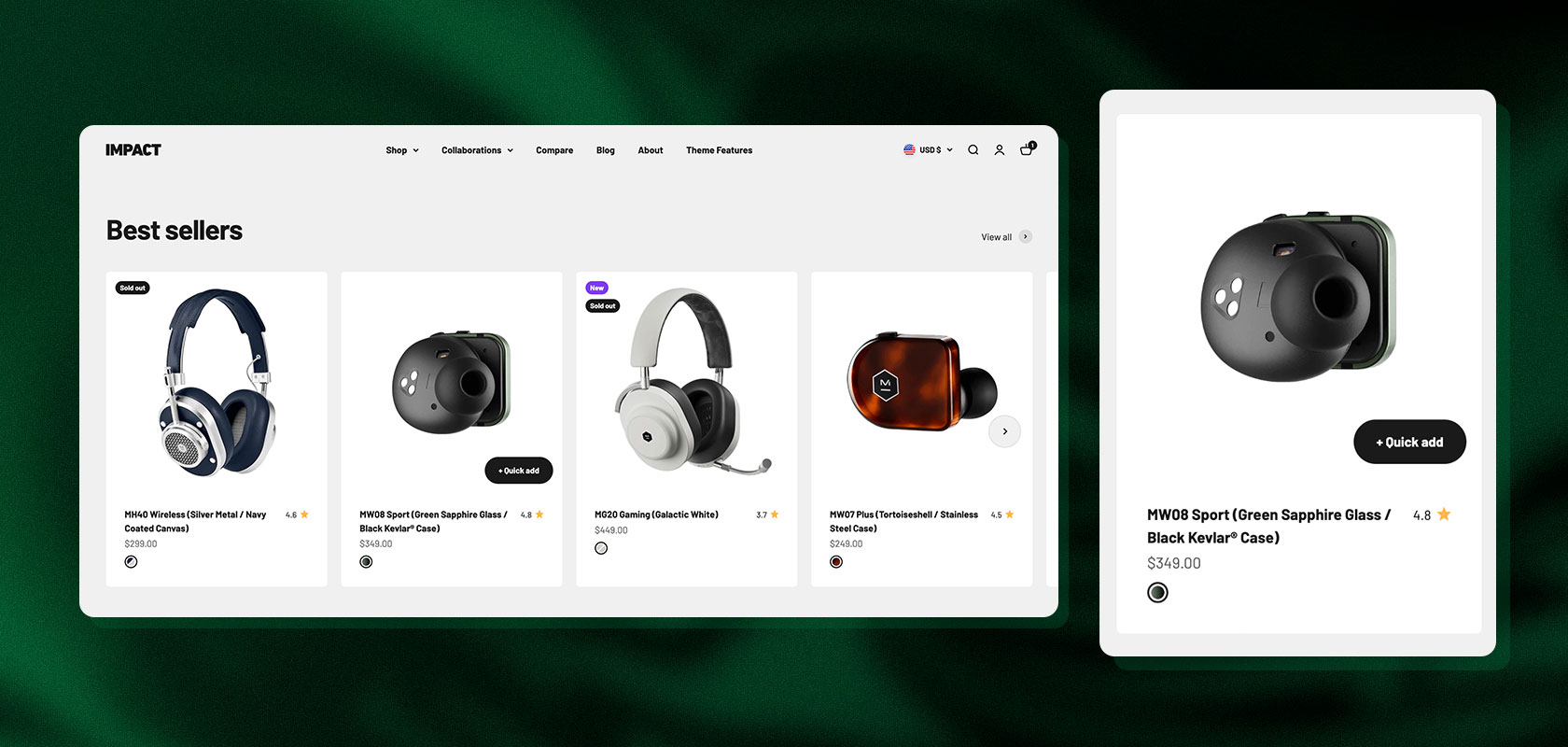
Maestrooo’s Impact theme is one of the most popular premium themes in the Shopify Theme Store. It’s specifically designed for brands that want to make a statement with an expressive, bold design and high conversion rates. With over 35 pre-built sections and numerous built-in e-commerce features, it promises to meet many standard requirements without the need for additional apps or complex custom development.
But does Impact live up to this claim in practice? Which third-party apps can actually be eliminated by using it, where does its technical architecture reach its limits, and how does the theme stack up in a direct comparison with classics like Dawn or Prestige? In this deep dive, we analyze the Impact Theme in detail, drawing on practical experience from our client projects as well as specific assessments from a development and SEO perspective.
Would you like to change your theme, or do you have other questions about Shopify? Contact us, and we'll be happy to help!
Impact by Maestrooo: What's Behind the Premium Theme
Impact was developed by the French agency Maestrooo, which is known within the Shopify ecosystem for its technically sound and well-designed premium themes. While many standard themes opt for a minimalist approach, Impact deliberately takes a bold approach: large-scale typography, high-contrast layouts, subtle parallax effects, and dynamic interactions define its look.
The theme is particularly well-suited for brands in industries such as fashion, streetwear, beauty, outdoor, consumer electronics, and fitness—segments where emotion, dynamism, and visual impact play a central role in the purchasing decision process.
Impact at a Glance
Property / Feature
Shopify Impact Theme
Developer
Maestrooo
Price
$400 USD (one-time purchase, lifetime license for one store)
Shopify Theme Architecture (OS 2.0), native Web Components / Custom Elements
Extensibility
Theme Editor, sections, app blocks, custom CSS/JS via events
Reviews
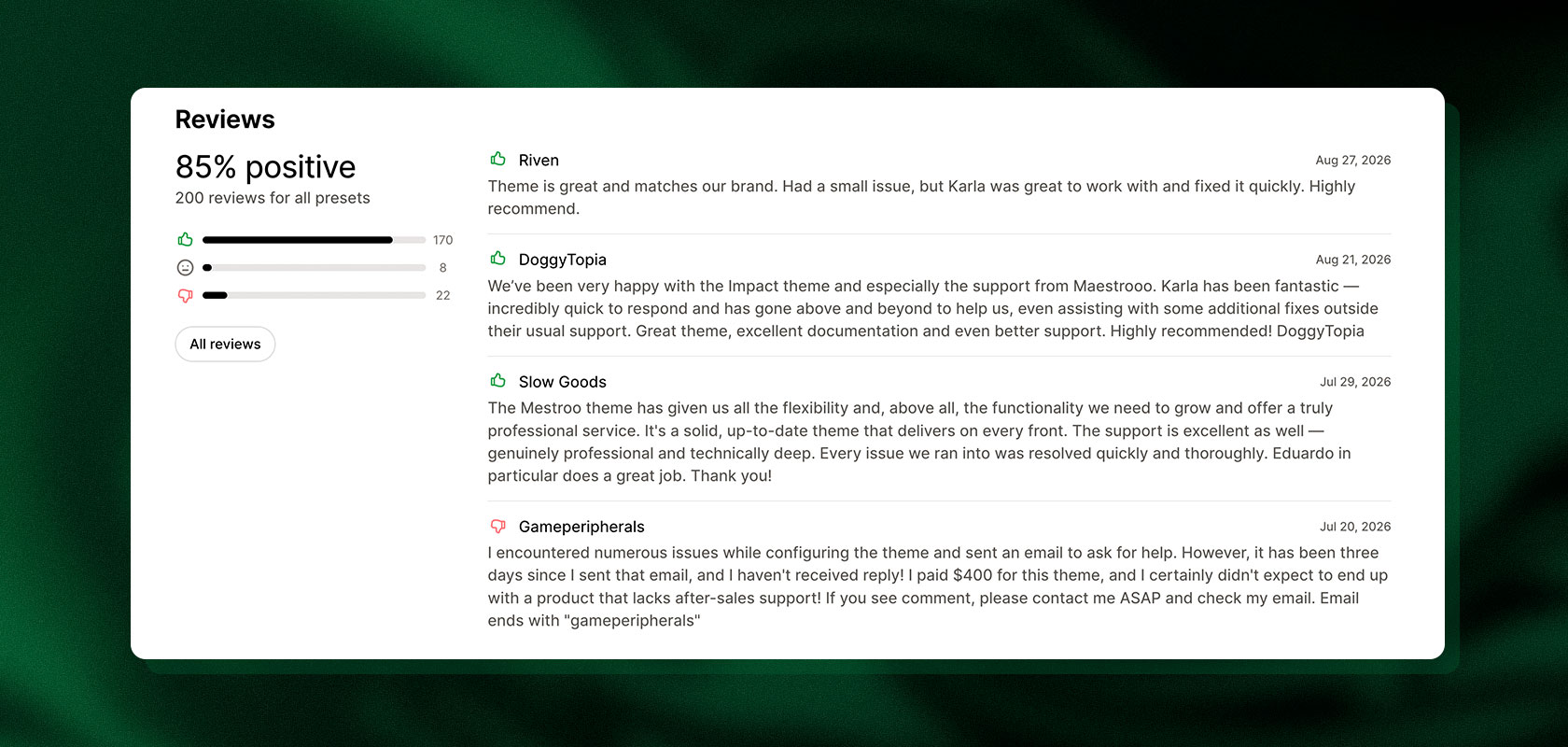
85% positive in the Shopify Theme Store (based on over 200 reviews)
Reviews in the Shopify Theme Store
With a satisfaction rate of 85%, Impact performs solidly. Retailers particularly highlight its design flexibility, the wide selection of sections, and the modern merchandising tools. Criticisms occasionally concern the availability of support for complex special requests, as well as isolated questions regarding documentation or the semantic heading hierarchy. As with any theme, store reviews offer a rough guide but are no substitute for a thorough assessment of your own project requirements.
Latori Expert Tip: Never base your theme selection solely on a demo installation. Demos feature idealized imagery and perfectly formatted text. Mentally apply the typography, white space, animation speed, and image formats to your actual product catalog early on: Does this dynamic look suit your products? The more you have to customize the theme afterward, the less cost-effective using a premium theme becomes.
An Overview of the Most Important Features
Impact’s strength lies in the level of detail in its pre-built e-commerce mechanics. Retailers can create sophisticated user journeys without having to write code right away or overload the store with apps.
35+ sections for flexible store pages
Impact offers a wide range of sections that can be flexibly placed on homepages, product pages, collection overviews, or editorial landing pages:
Image and video sections for eye-catching storytelling
Collection tabs and product grids for quick browsing
Interactive “Shop the Look” sections with clickable product hotspots
Countdown timers, scrolling marquee text, and dynamic promotional banners
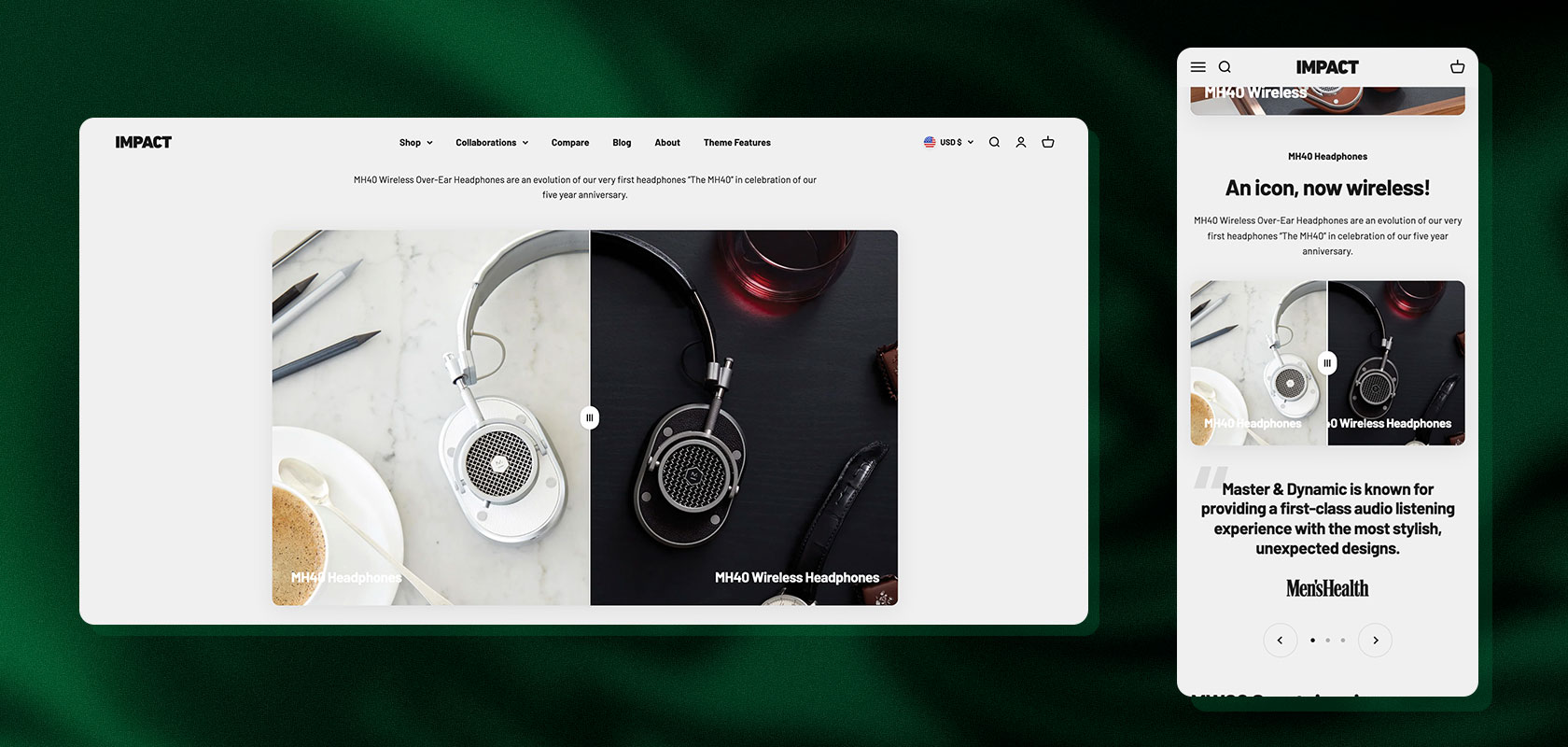
Before-and-after image comparisons
Trust elements such as logo bars, press quotes, certifications, and FAQ accordions
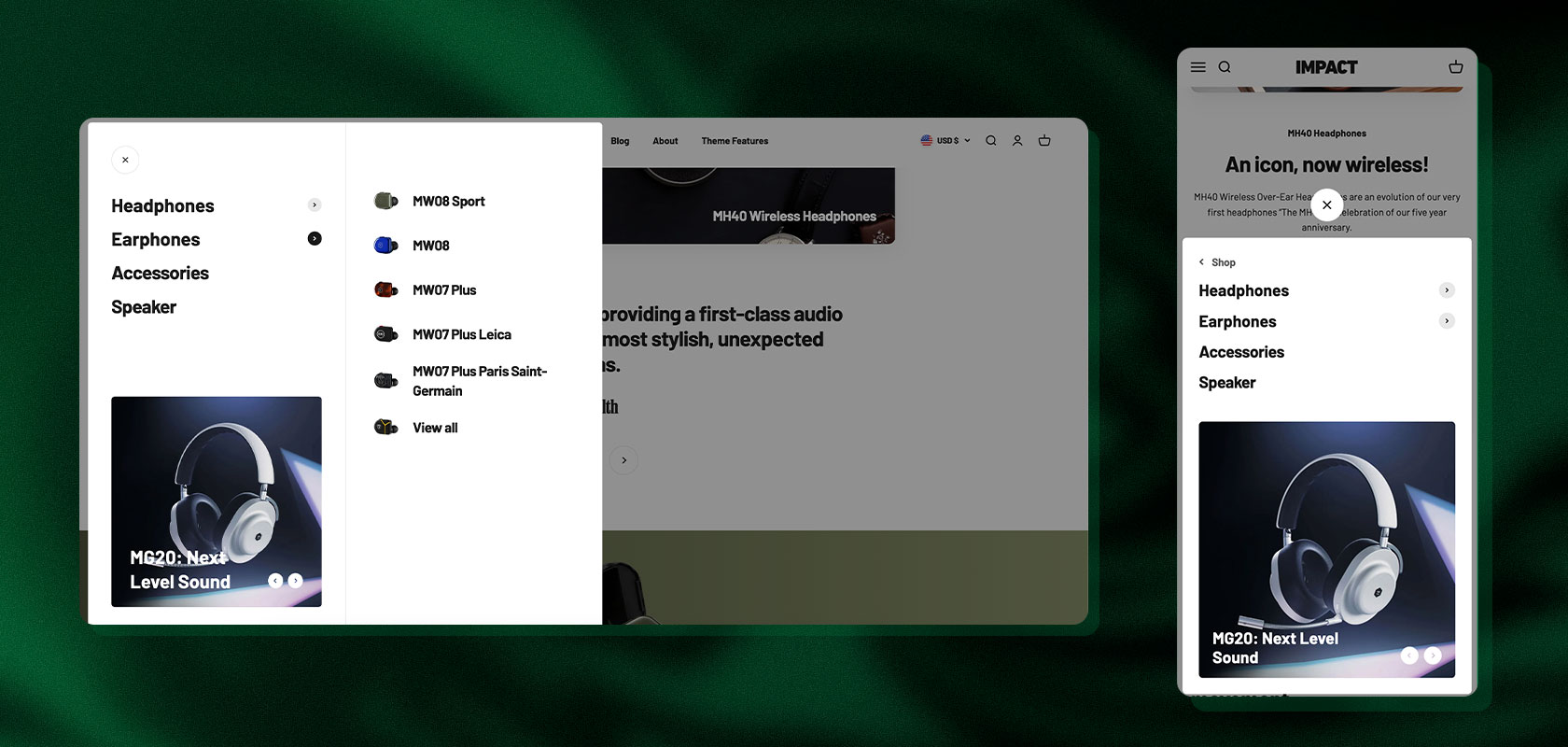
Flexible mega menu for large product ranges
Confusing navigation costs revenue. Impact’s mega menu not only organizes extensive category structures but also links the information architecture directly to merchandising: Promoted collections, product images, and limited-time promotions can be embedded directly into the menu levels.
Reading tip: In our article on UX/UI design for Shopify stores, we explain how navigation, product presentation, and usability influence the shopping experience.
Native Comparison Tables for Products That Require Explanation
An important feature is the built-in comparison table. Customers can compare product features directly within the store—a feature that usually requires expensive apps. This can help increase the conversion rate, especially for technical products, sports equipment, cosmetics, or dietary supplements, as customers can immediately grasp the differences and make more informed purchasing decisions.
Sebastian Holgado
Shopify Developer at Latori
“Impact natively supports Shopify’s latest front-end features. The mega menu and built-in comparison tables, in particular, are extremely versatile. They help merchants organize complex catalogs in a clean, structured way and make it noticeably easier for customers to make purchasing decisions.”
Faster Purchases: Quick Buy & Sticky Add-to-Cart
To minimize friction in the purchasing process, Impact integrates:
Quick Buy: Customers can configure products directly from the collection view and add them to the cart without having to navigate to the product detail page.
Sticky Add-to-Cart: For longer product descriptions, the “Buy” button remains fixed at the edge of the screen as the user scrolls.
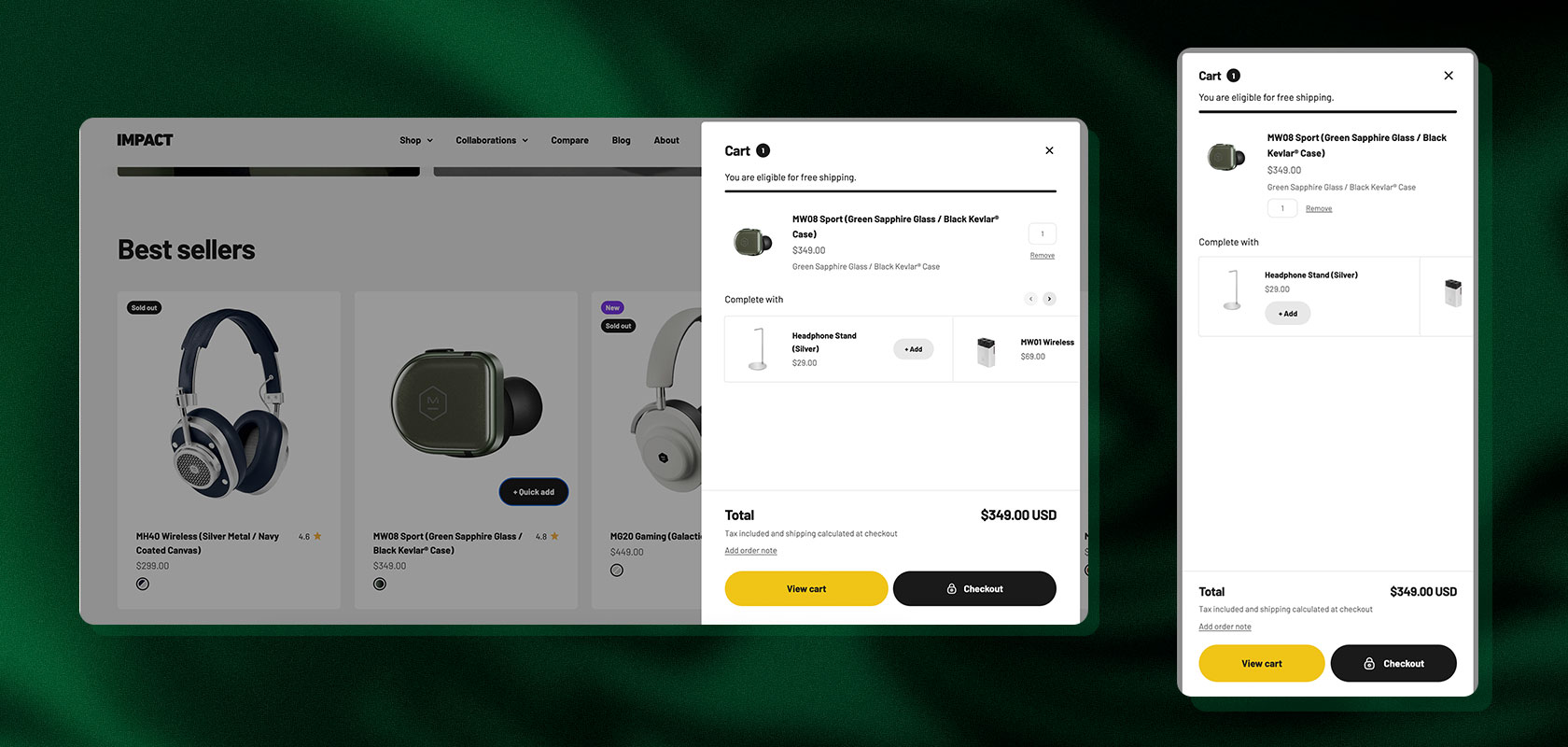
Conversion-Optimized Cart Drawer
The slide-out cart is more than just a temporary holding area. It includes built-in features designed to increase the average order value (AOV):
a dynamic progress bar for free shipping
targeted in-cart upsells and accessory recommendations
input fields for order notes and options such as gift wrapping
Which apps does Impact make obsolete?
For standard requirements, Impact saves on ongoing costs since no external apps are needed. This applies especially to the following use cases:
Free shipping progress bars
Simple shopping cart upsells and cross-sells
Sticky “Add to Cart” bars
Color and image swatches for product variants
Shoppable hotspots on images
Mega menu extensions
Basic pop-ups for newsletters and discount promotions
Latori Expert Tip: Before installing any app, check whether Impact already offers the feature natively. Every third-party app you avoid reduces JavaScript bloat, lowers your monthly fixed costs, and protects your store from unforeseen code conflicts during future updates.
The Benefits of the Impact Theme
Why do so many merchants choose Impact over a custom build? The advantages lie in the balance between design flexibility and standardization:
High design flexibility without custom development: Thanks to the wide variety of modules, you can build professional stores that stand out significantly from the cookie-cutter look of simple standard themes.
Powerful conversion features right out of the box: Well-designed cart drawer mechanics, quick-buy options, and trust-building elements support sales from the very start.
Excellent for extensive catalogs: Advanced filtering, collection tabs, and visual mega menus ensure clear navigation even with hundreds or thousands of SKUs.
Modern technical codebase: Maestrooo relies on contemporary web standards instead of outdated frameworks. This ensures a structured development environment.
Reusable design tokens: Typography, spacing, colors, and layout elements are controlled via central design tokens. Custom sections blend harmoniously into the overall design.
The Drawbacks and Technical Limitations
Despite its many strengths, the Impact Theme also has some minor weaknesses. There are solid reasons that may argue against using it:
Its bold look doesn’t suit every brand: The bold typography, animations, and high information density work excellently for streetwear or sporting goods, but clash with the understated, exclusive image of a high-end luxury brand.
Performance risks due to feature overload: Activating all visual options without careful consideration (large sliders, video backgrounds, constant text animations) slows down loading times, especially on mobile devices.
Limitations with complex product logic: As soon as products need to be configured using complex metafield dependencies, dynamic B2B tiered pricing comes into play, or customer-specific bundles are required, the native theme reaches its limits and requires custom code.
App compatibility in the Quick Buy modal: Third-party apps (such as product configurators, engraving tools, or review widgets) often expect the full context of a regular product detail page. Within a Quick Buy pop-up, they sometimes do not function without custom adjustments.
Increased update effort with deep modifications: If the theme’s core codebase is significantly altered—rather than adding new features in a clean, modular way—applying future Maestrooo updates becomes time-consuming and costly.
Impact, Dawn, or Prestige: Which theme is right for your store?
On Shopify, merchants are usually faced with a fundamental decision: Start for free with Shopify Dawn, or invest in an established premium theme like Impact or Shopify’s Prestige theme?
Impact vs. Dawn: Dawn is Shopify’s streamlined reference theme. It’s minimalist but offers only basic features out of the box. Users of Dawn must develop many features themselves or add them via apps. Impact, on the other hand, is a fully equipped, ready-to-use product with a rich section library.
Impact vs. Prestige: Both themes were created by Maestrooo and are now based on the same solid technical architecture. The key difference lies in their brand and design philosophies.
Mohamed Hamid
Shopify Developer at Latori
“Prestige is geared toward luxury and editorial design. It thrives on generous white space, refined typography, and understated storytelling to make products appear exclusive. Impact is the exact opposite: It relies on maximum energy, strong contrasts, and a high density of promotional elements to drive conversions and create a sense of urgency. Technically, both are excellent; what matters most is the brand identity.”
Comparison Chart: Impact, Dawn, and Prestige
Criterion
Shopify Impact
Shopify Dawn
Shopify Prestige
Price
$400 USD
Free
$400 USD
Design Character
Dynamic, bold, loud
Neutral, minimalist
Editorial, calm, luxurious
Merchandising Tools
Very extensive (native)
Basic equipment
Very extensive (native)
Integrated Conversion Features
Very many
Few (requires apps)
Many
Extensibility for Devs
Very good (Web Components)
Excellent (lean base)
Very good (Web Components)
Baseline Performance
Good, requires configuration
Excellent (very lightweight)
Good, requires configuration
Ideal Target Audience
DTC brands, drops, lifestyle
Budget starts, custom builds
Premium & luxury brands
When should you choose which theme?
Choose Impact if: You run an energetic brand, run many campaigns and promotions, want to visually showcase a broad product range, and are looking for a turnkey feature package without an app jungle.
Choose Dawn if: you want to start with minimal fixed costs, plan a completely custom design from scratch, or prioritize maximum raw performance on budget smartphones as your key metric.
Choose Prestige if: your products thrive on elegance, calm, and detailed storytelling, and your brand identity should convey quality rather than loud advertising messages.
Latori Expert Tip: Before purchasing a theme, create a prioritized list of requirements (must-haves vs. nice-to-haves). Which features must be available on launch day? What requirements do your inventory management system, ERP, or product data impose? Only once these interfaces have been clarified can you assess which theme provides the most cost-effective foundation.
Reading tip: Want to know how to strategically structure the selection process? In our guide to Shopify themes, we’ll show you the most important criteria for choosing a theme.
Impact from a Developer’s Perspective: Technology and Extensibility
A premium theme must do more than just work in the Shopify Theme Editor for the marketing team. For the long-term success of an online store, the technical infrastructure behind the scenes is just as crucial: How cleanly is the codebase structured? Can the theme be extended without any side effects? And how complex will future theme updates become if custom logic has been implemented?
From the perspective of experienced Shopify developers, Impact positions itself not as an empty developer framework, but as a highly mature, ready-to-use product. This offers enormous advantages in terms of implementation speed in day-to-day development, but requires a precise understanding of the given architecture for more in-depth customizations.
Modern Tech Stack: Native Web Components Instead of Framework Ballast
With Impact, Maestrooo consistently avoids outdated libraries like jQuery and steers clear of the performance overhead of heavyweight JavaScript frameworks like React or Vue on the front end.
Vanilla JS Custom Elements (Web Components): All interactive UI components—from the slide-out cart and variant selector to modals, accordions, and sliders—are encapsulated as native custom elements. This ensures lean, modular code that builds directly on browser standards.
Targeted, lightweight libraries: Instead of massive script packages, only specialized micro-libraries are used. The theme uses Motion (formerly Motion One) for smooth micro-interactions and animations, and a resource-efficient PhotoSwipe implementation for image zooming and lightbox effects.
Shopify Section Rendering API: Dynamic updates—such as when products are added to the cart or filters are applied to the collection grid—occur seamlessly in the background via Shopify’s native Section Rendering API, without requiring the entire page to be re-rendered.
Styling Architecture & Design Tokens: Consistency Out of the Box
Impact’s styling relies heavily on CSS Custom Properties (CSS variables), which are dynamically generated from the theme settings.
Centralized Design Tokens: Colors, fonts, line spacing, radii, and grid systems are defined globally. Developers creating new sections or app blocks can reuse these tokens directly. This prevents inconsistent styles and ensures that custom developments blend seamlessly into the overall design.
Keep style overrides separate: Since the theme uses many inline styles and dynamic variables, developers should never edit the compiled theme.css file directly. Any manual changes made there will inevitably be lost during the next theme update. Best practice is to load a separate child stylesheet (custom.css) after the theme styles or to use Shopify’s native custom CSS feature at the section level.
Event-Driven JavaScript: Extending Without Monkey Patching
A common mistake in theme development is directly overwriting scripts in the core bundle. Impact offers a much more elegant, event-based interface for this:
Custom DOM Events: The theme dispatches clean JavaScript events during key user interactions (such as when switching variants or making changes to the cart).
Decoupled Logic: Developers can attach regular event listeners (addEventListener) to these events to trigger third-party tracking, initiate dynamic price calculations, or synchronize external widgets.
Programmatic Cart Triggers: Actions—such as refreshing the shopping cart after an API call—can also be triggered via standardized events without having to modify the core Web Components.
“From a developer’s perspective, working with Impact feels more like extending a finished software product than coding from scratch on a blank framework. Creating custom sections and making visual adjustments is extremely quick thanks to the clean structure and the excellent Maestrooo documentation. It only becomes challenging when you have to delve deep into the core behavior: Then you’re not working with your own architecture, but have to skillfully work around existing conventions.” — Mohamed Hamid, Shopify Developer at Latori
Where Developers Hit Limits
Despite all its modernity, even a standardized premium theme reaches technical limits when a merchant’s requirements go beyond typical e-commerce standards:
Complex Variant Logic & Custom Data: By default, the variant picker handles standard Shopify structures exceptionally well. However, as soon as complex dependencies come into play (e.g., color swatches loaded dynamically from nested metafields, location-based availability logic, or the targeted hiding of unproducible variant combinations), the theme markup is no longer sufficient. In these cases, developers often have to implement extensive custom layers on top of Custom Elements.
Pricing & B2B Logic: Like any Shopify theme, Impact cannot independently manipulate backend pricing rules or dynamic tiered pricing. This requires Shopify Functions, custom apps, or third-party solutions, which must be technically integrated into the frontend.
App Incompatibilities in the Quick Buy Modal: Since Quick Buy windows often render only a reduced set of product data, apps for complex product configurators, engraving previews, or installment payment widgets frequently fail to function within the modal because they lack the full DOM context of the product detail page (product.json).
Markup Coupling & Settings Overhead: The components are tightly coupled to Maestrooo’s internal Liquid snippets. Furthermore, the sheer volume of configurable theme settings generates a considerable number of CSS variables and conditional Liquid markup, which is processed in the DOM even when certain features aren’t activated in the store at all.
Latori Expert Tip for Developers: When working with Impact, follow the principle of modular encapsulation: Never modify core theme snippets unless absolutely necessary. Always implement custom requirements as standalone sections, app blocks, or decoupled web components that communicate with Impact solely through events. This is the only way to ensure your store remains future-proof and to prevent the implementation of important security and feature updates from Maestrooo from turning into a migration project that takes days.
Performance, SEO, GEO, and AEO: How future-proof is Impact?
No matter how good an online store looks, if it loads slowly or isn’t understood by search engines and AI systems, it won’t be successful.
Performance & Core Web Vitals
Impact provides a solid technical foundation, but in practice requires targeted configuration. The following factors are crucial:
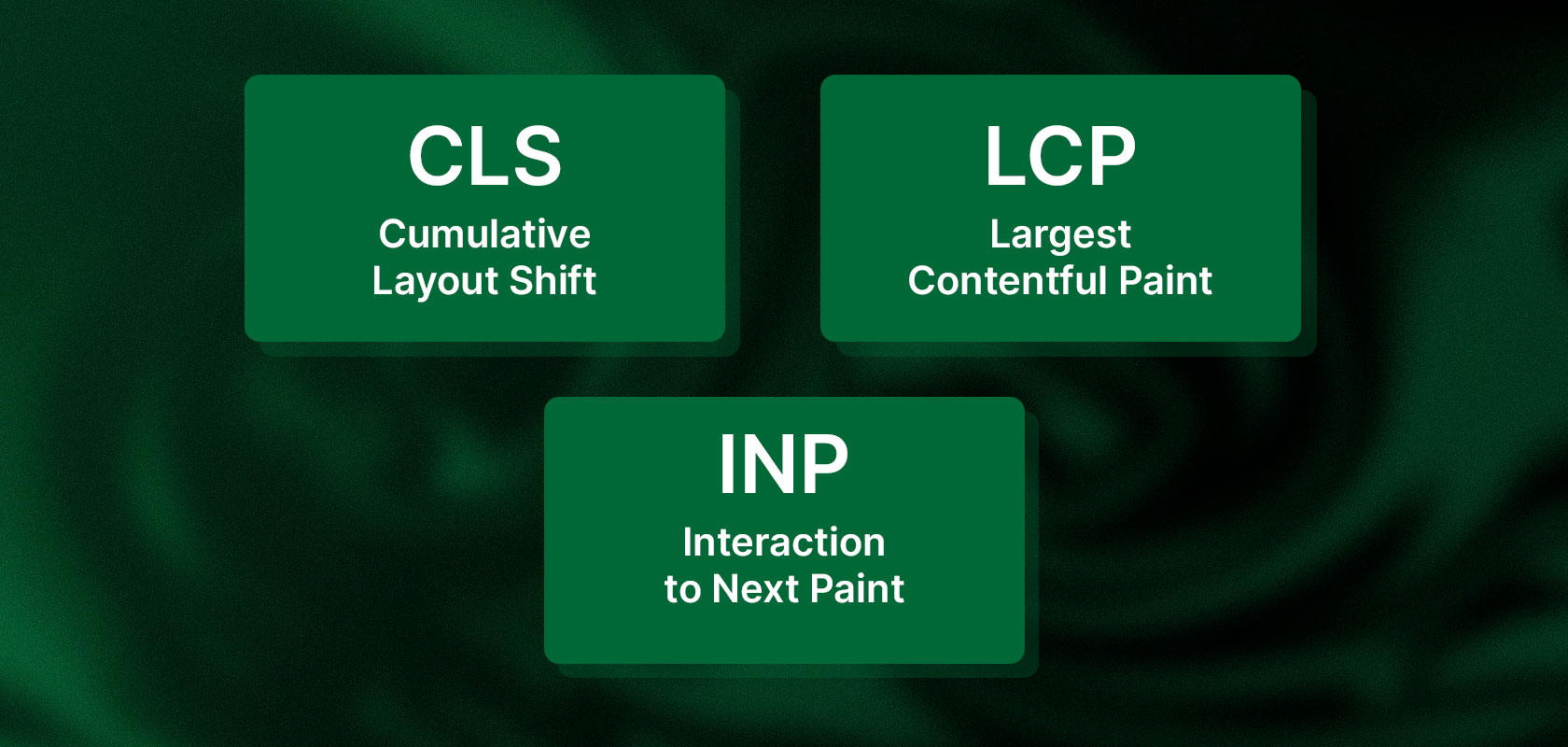
LCP (Largest Contentful Paint): Full-width hero sliders and background videos in the visible area (above the fold) are the biggest LCP bottlenecks. On mobile devices, use static, optimized images, set fetchpriority="high", and avoid lazy loading for the first visible image. Disable delayed fade-in animations for hero text.
CLS (Cumulative Layout Shift): Layout shifts are often caused by app widgets that load later (e.g., reviews or BNPL calculators) as well as dynamic announcement bars. Reserve fixed minimum heights (placeholders) for such elements in the CSS.
INP (Interaction to Next Paint): A sluggish response time to clicks usually stems from overloaded JavaScript. Reduce third-party tracking scripts and test complex product pages with many variants on mobile devices.
Latori Expert Tip: Don’t measure performance solely on the homepage using a fast desktop computer. Collection pages with filters and product detail pages with variant logic place a much heavier load on the CPUs of mobile devices. Always test your Core Web Vitals with throttled mobile bandwidth (mobile throttling) and review the real-world field data in the Google Search Console Chrome UX Report.
Reading tip: For more specific steps on page load times, product presentation, and technical optimizations, check out our guide to optimizing your online store.
SEO, AEO, and GEO: Are You Ready for Google and AI Search Engines?
In addition to traditional search engine optimization (SEO), Answer Engine Optimization (AEO) and Generative Engine Optimization (GEO) are coming into focus. AI search engines such as Perplexity, ChatGPT Search, and Google’s AI Overviews scan content for precise answers, entities, and logical connections.
Impact provides excellent structural building blocks for this: native FAQ sections, modular text blocks, and comparison tables offer the perfect foundation for presenting products in a machine-readable format. But the technology is only half the battle.
Linda Kasner
SEO Specialist at Latori
“A theme is always just the technical foundation for an online store’s visibility. Impact also offers a solid foundation for SEO, AEO, and GEO. What matters most is that product information, content, and internal links are clearly structured so that search engines and AI systems can reliably interpret the content. A comprehensive set of features alone does not guarantee that a store will be found more easily or recommended more often in AI responses.”
What Matters for Modern Visibility:
Clear Semantic Hierarchy: Avoid misusing heading tags (H1 through H4) purely as styling elements. The structure must logically organize the content.
Structured data (Schema.org): Ensure that product data (price, availability, variants, reviews) is rendered correctly as JSON-LD.
Specific product details instead of clichés: Describe dimensions, ingredients, compatibility, and use cases precisely, because these are exactly the details that generative AI systems use to make purchase recommendations.
Who is the Impact Theme best suited for, and who should avoid it?
Based on our past projects, clear patterns have emerged regarding which stores would benefit from the license and where alternatives are more cost-effective:
Ideal for:
Campaign-oriented DTC brands: Brands that regularly release new collections, hold sales, or run seasonal campaigns.
Product ranges with a strong visual focus: streetwear, athletic wear, fitness equipment, cosmetics, modern home accessories, and consumer electronics.
Medium to large product catalogs: Retailers who benefit from flexible collection tabs, interactive filters, and visually guided mega menus.
Retailers looking to reduce app costs: Stores that want to natively use features such as sticky “Add to Cart,” free shipping bars, and hotspots.
Less suitable for:
Minimalist luxury and niche brands: For high-end jewelry, artisanal brands, or fine crafts, Impact’s visual intensity often seems out of place. In these cases, Maestrooo’s sister theme, Prestige, is the better choice.
Projects with complex B2B or configuration logic: Stores with multi-tiered pricing, customer-specific catalogs, or configurators that operate outside the standard Liquid logic.
Retailers with an extremely tight budget for customization: Anyone who buys Impact only to completely redesign it afterward is wasting their budget. If you don’t like at least 80% of the default design, Dawn is often the more cost-effective foundation.
Real-world Latori experiences with Impact
Our developers have already implemented Impact across a wide range of industries and catalog sizes. Among others, the theme has been used in projects for Fissler,AMC, Liquid Life, Cellavent, and Calligraphy Cut. These projects demonstrate that this theme can be used for a wide variety of online stores, such as those selling high-end household goods, dietary supplements, and even B2C and B2B products that require detailed explanations.
Conclusion: Is the Shopify Impact Theme the Right Choice?
Maestrooo’s Impact Theme fully justifies its premium price of $400 for the right target audience. It impresses with modern web components, an excellent selection of sales-boosting sections, and well-thought-out features such as comparison tables and an optimized cart drawer.
In many cases, merchants save on monthly app fees and launch with a storefront design that exudes dynamism and professionalism. However, those seeking an understated, exclusive brand aesthetic or needing to implement highly customized product logic should consider alternatives such as Prestige or a custom theme development based on Dawn.
Would you like to find out which Shopify theme best suits your business model, or do you need help with the technical optimization of your store? Contact our Latori team for a no-obligation consultation.
Frequently Asked Questions About the Impact Theme
How much does the Shopify Impact Theme cost?
The Shopify Impact Theme costs a one-time fee of $400 USD in the official Shopify Theme Store. The purchase includes a lifetime license for one store, including all future feature and security updates from Maestrooo. There are no recurring license fees; subsequent costs only arise from optional third-party apps or custom development work.
How well is the Impact Theme rated?
Impact achieves an 85% positive customer satisfaction rating in the Shopify Theme Store across more than 200 reviews. Merchants particularly praise the high-converting sections, the flexible merchandising tools, and the modern design. Criticisms include occasional delays in agency support for complex custom requests and gaps in the technical documentation.
Which design presets does the Impact Theme offer?
Impact comes with three pre-built presets:
Impact: High-contrast, large-scale typography, dynamic cuts – optimized for streetwear, fitness, and product drops.
Cocoon: Softer colors, organic shapes, calmer layout – ideal for beauty, wellness, and home accessories.
Balance: Clearly structured grid, strong focus on information – suitable for consumer electronics, technology, and outdoor gear.
Is the Impact Theme suitable for large product catalogs?
Yes, Impact is specifically designed for medium to large catalogs with hundreds or thousands of SKUs. The theme includes multi-level mega menus with visual promotional banners, collection tabs, and fast AJAX filters out of the box. Limitations only arise with complex nested B2B tier-pricing logic or external product configurators that exceed standard Liquid logic.
What is the difference between Impact and Prestige?
Impact focuses on visual boldness and a high conversion density, whereas Prestige is designed for calm, high-end, and editorial design. Both themes cost $400 USD, are developed by Maestrooo, and are built on the same modern Web Components architecture. Merchants with promotion-driven lifestyle or DTC brands typically choose Impact; those aiming to showcase luxury goods, jewelry, or handcrafted items with plenty of whitespace usually go for Prestige.
Which is better: Impact or Shopify Dawn?
Impact is a fully equipped, turnkey premium theme ($400 USD), whereas Dawn is Shopify’s free, highly stripped-down reference theme. Dawn offers maximum raw performance and a blank development canvas, but requires additional apps or custom coding for features like swatches, sticky carts, or mega menus. Impact includes over 35 conversion-focused sections out of the box, saving on recurring monthly app costs.
How fast is the Impact Theme regarding Core Web Vitals?
Thanks to native Custom Elements and the absence of heavy frameworks like jQuery, Impact has a very lean technical foundation; however, it requires deliberate configuration in a production environment. If full-width hero sliders, above-the-fold autoplay background videos, and overloaded third-party apps are used carelessly, LCP and INP scores can drop rapidly on mobile devices. With compressed WebP images and a static hero section, the theme achieves solid load times.
Is the Impact Theme optimized for SEO?
Yes, Impact provides a solid technical SEO foundation with clean HTML5 markup, fast loading speeds, and responsive design. To achieve top rankings, however, merchants must ensure that heading hierarchies (H1–H4) are applied semantically within theme sections and that product data is consistently output as JSON-LD (Schema.org). The theme alone does not guarantee high rankings without an editorial SEO strategy.
Is Impact suitable for GEO and AEO (AI search engines)?
Yes, thanks to its modular content blocks, Impact is exceptionally well-suited for Answer Engine Optimization (AEO) and Generative Engine Optimization (GEO). Native components such as FAQ accordions, technical product spec tables, and feature lists enable AI crawlers (ChatGPT Search, Perplexity, Google AI Overviews) to programmatically extract entities and product facts and cite them in answers.
Can developers flexibly customize the Impact Theme?
Yes, Impact can be cleanly and modularly extended using custom sections, app blocks, and child stylesheets (custom.css). For JavaScript interactions, the theme dispatches standardized custom DOM events (e.g., on variant changes or cart updates), allowing developers to attach update-safe listeners via addEventListener without having to modify Maestrooo's core code.
Which Shopify apps can the Impact Theme replace?
For standard requirements, Impact can render several third-party apps obsolete:
Free shipping progress bar in the cart
Sticky Add-to-Cart bars on product detail pages
Slide-out cart drawer with upsell and cross-sell modules
Color and image swatches for product variants
Interactive "Shop the Look" sections (image hotspots)